vSAN iSCSI targets configuration deep dive
I have been asked about vSAN iSCSI target configuration and how the objects looks within vSAN ? Here is a small guide that gets you going with vSAN iSCSI configuration and how you get to see the actual luns within vSAN as vSAN objects .
The iSCSI lun creation and presentation is very simple , I have put together screenshots from my lab to create and export vSAN iSCSI luns to a Windows server 2012 box . Please follow the series of screenshots to create and setup iSCSI exports from vSAN to external physical machines . In the below example we do not see creation of initiator group , usually initiator groups are created to allow a set of Luns to a certain set of IQN to which the luns must be visible .
Note: iSCSI Lun exports to virtual machines is unsupported officially , strictly refrain from presenting an iSCSI vSAN export to a VM in production environment .*
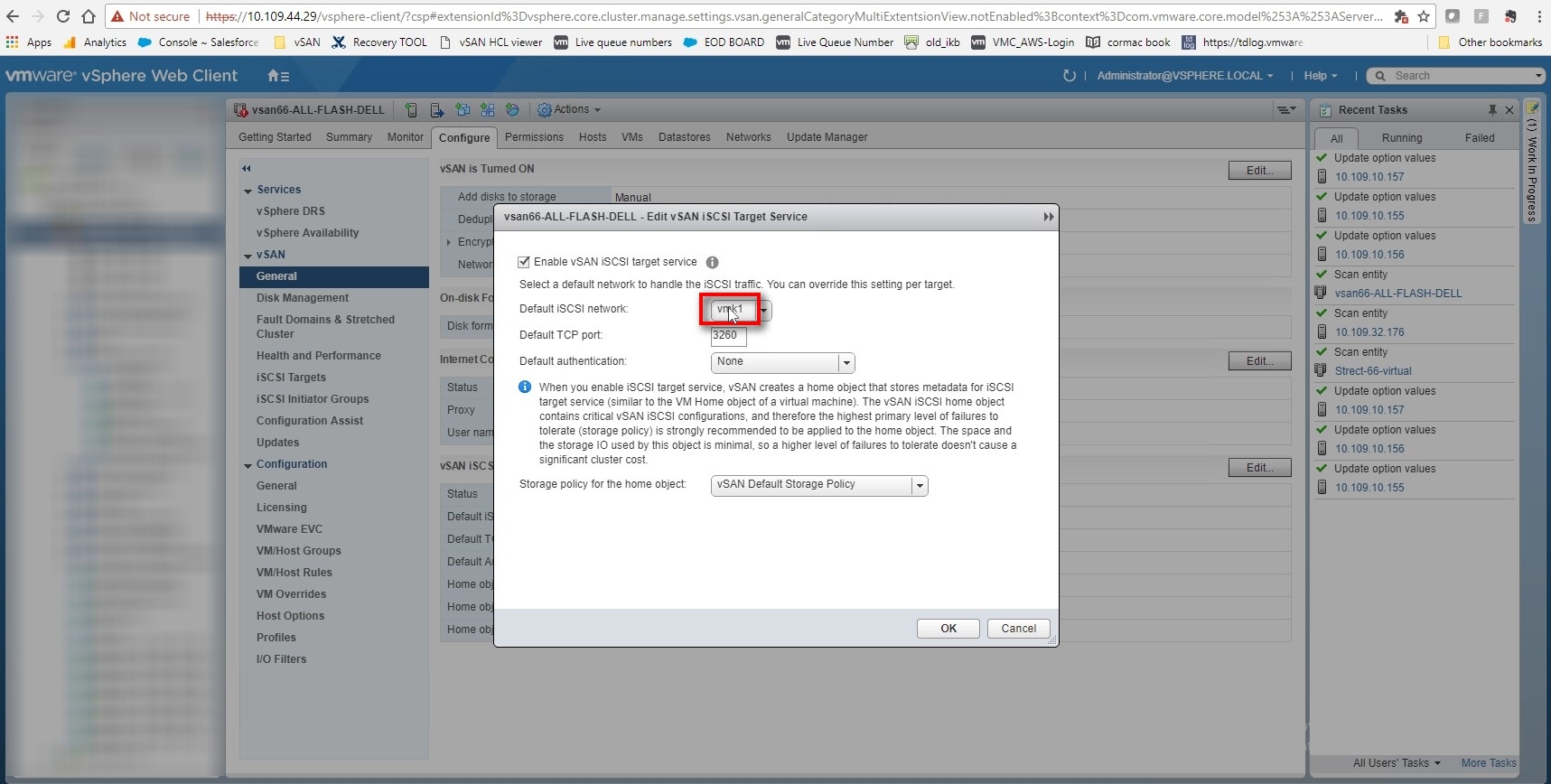
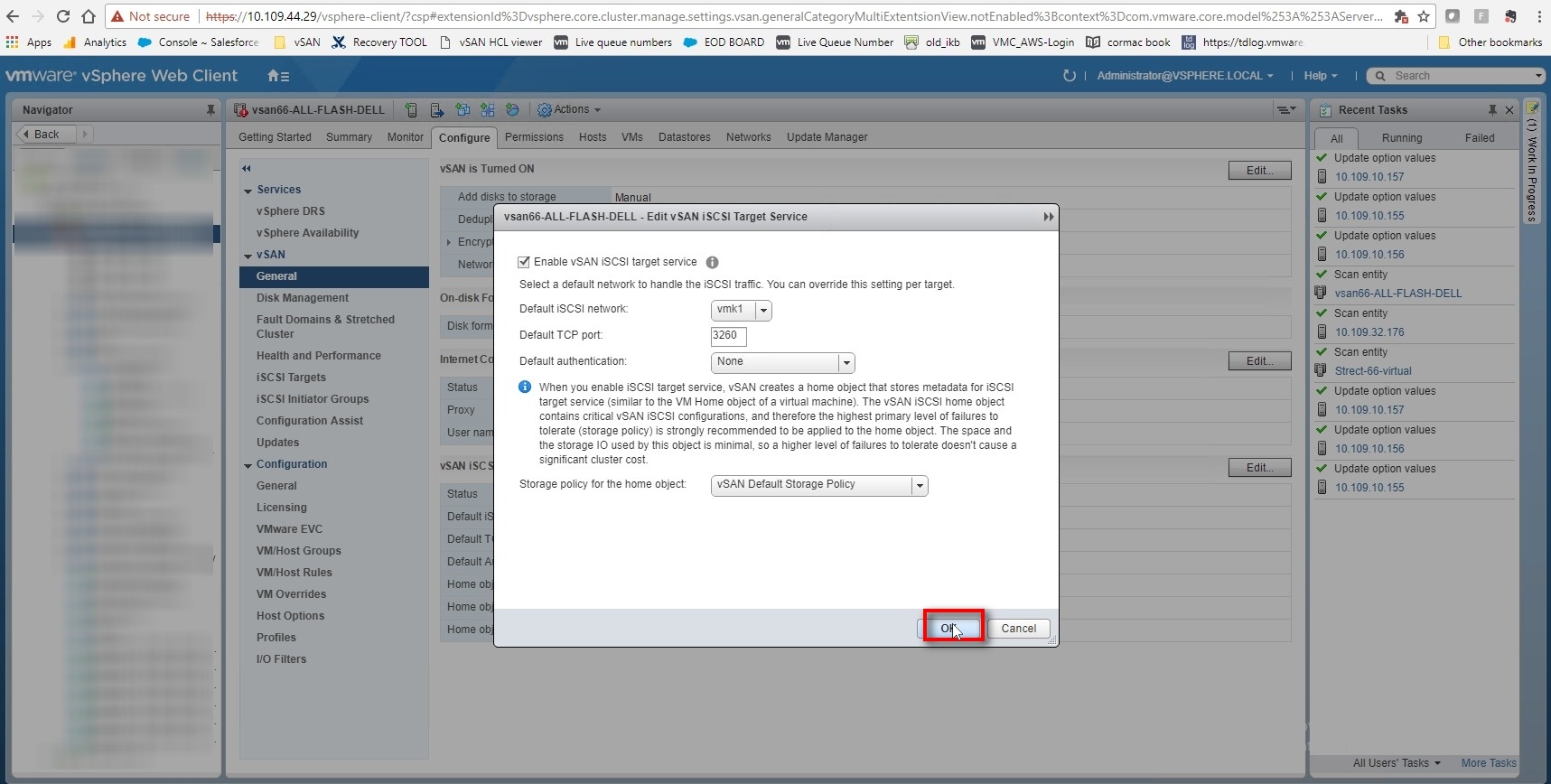
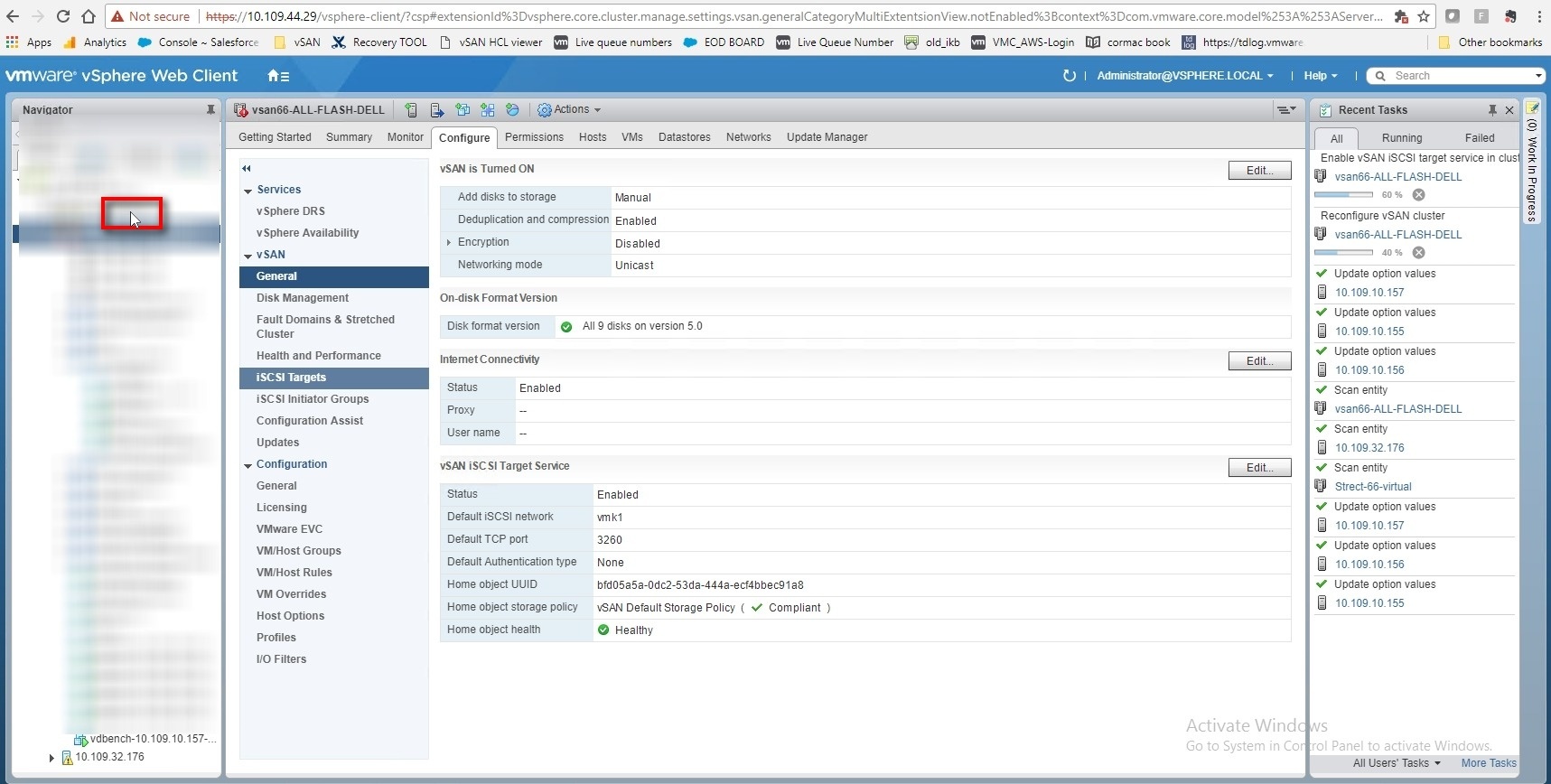
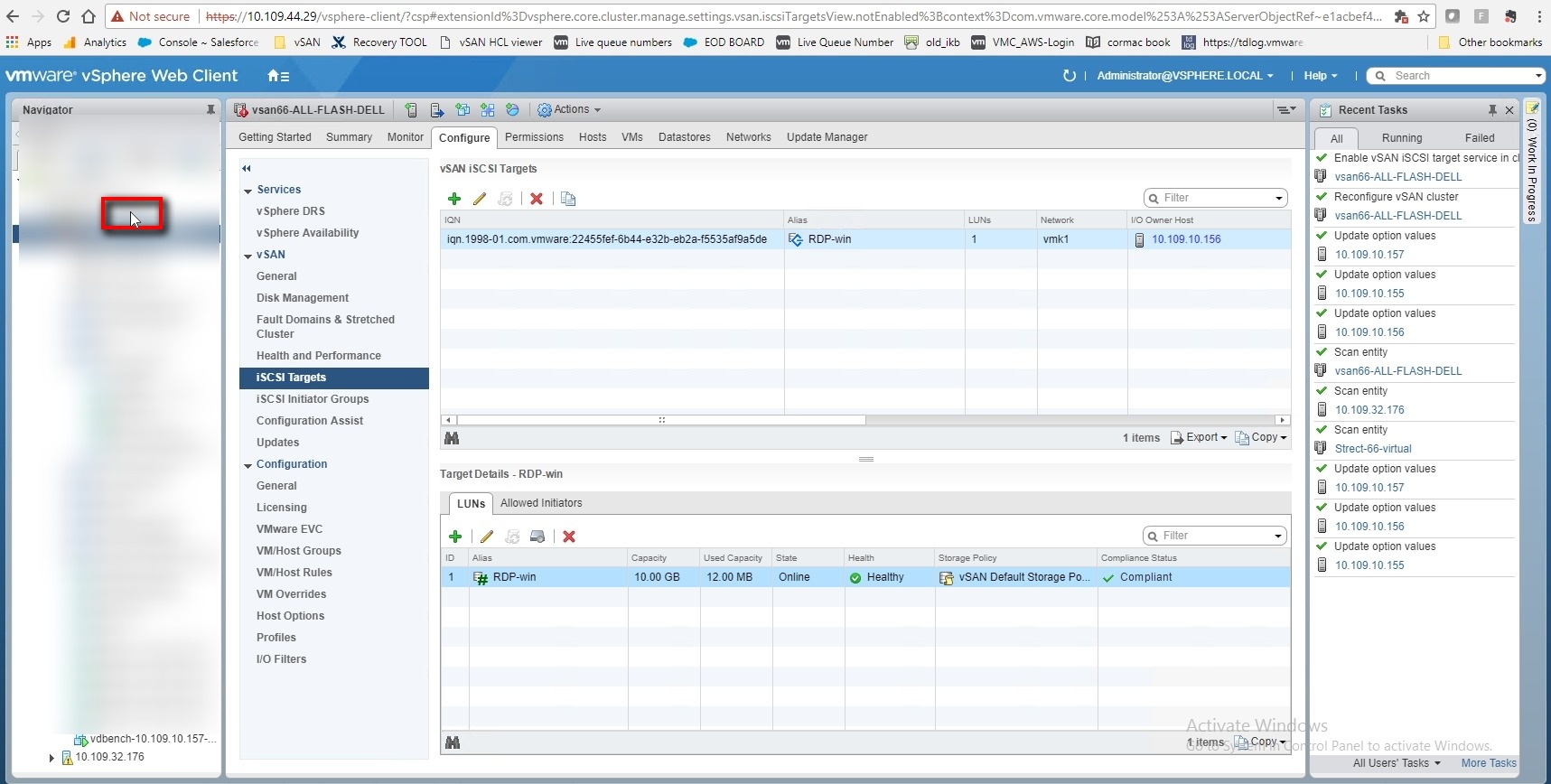
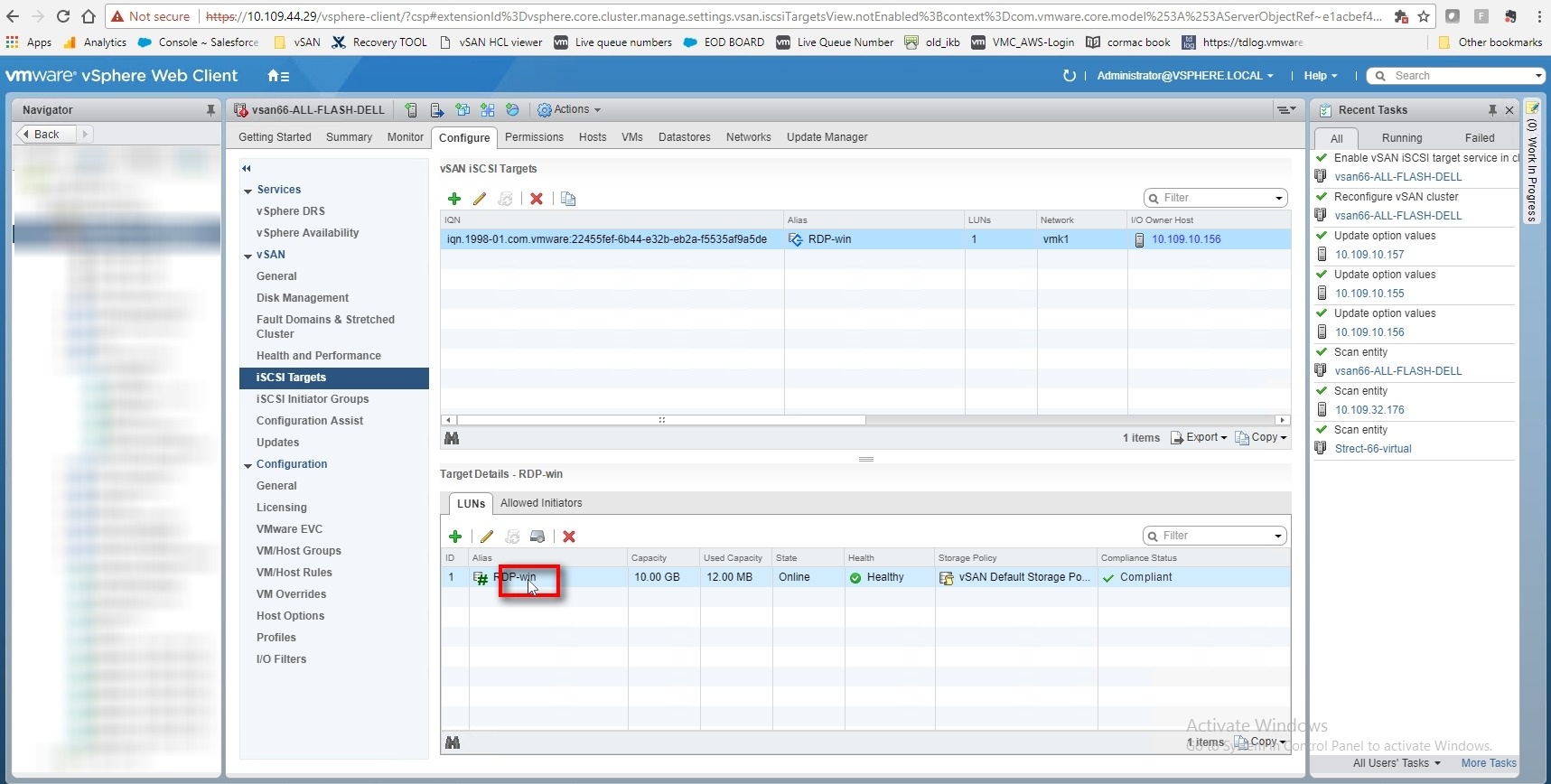
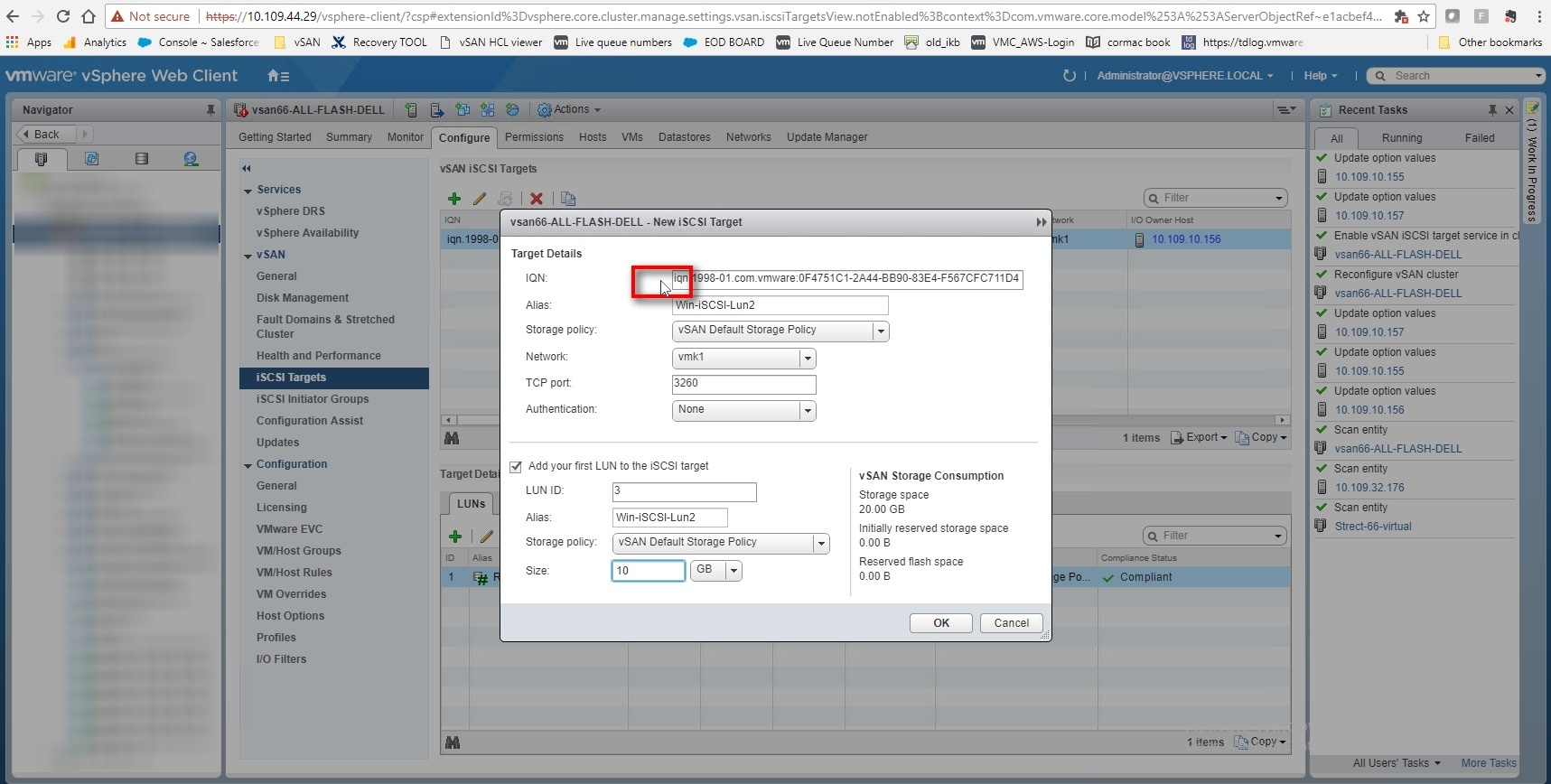
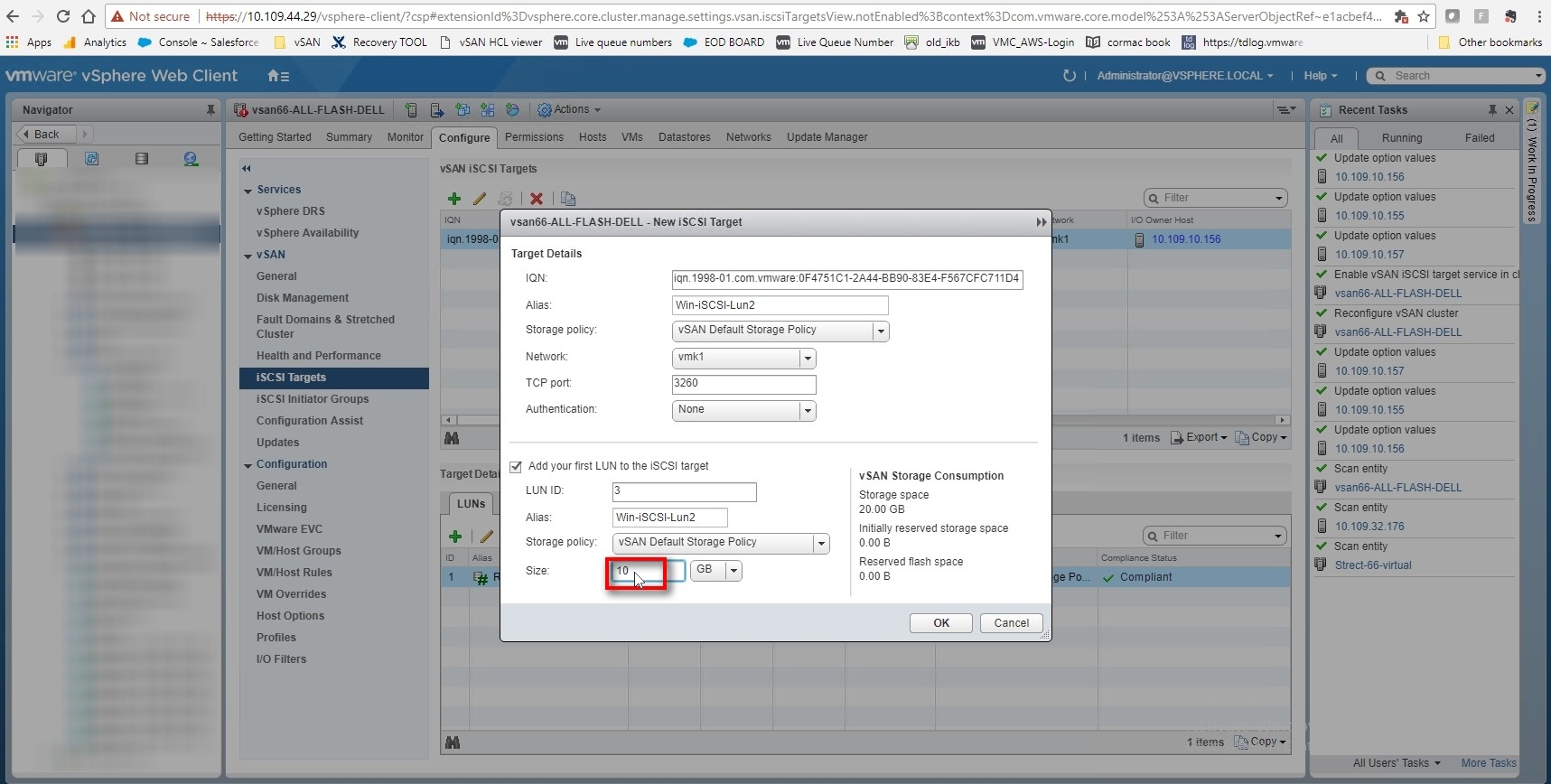
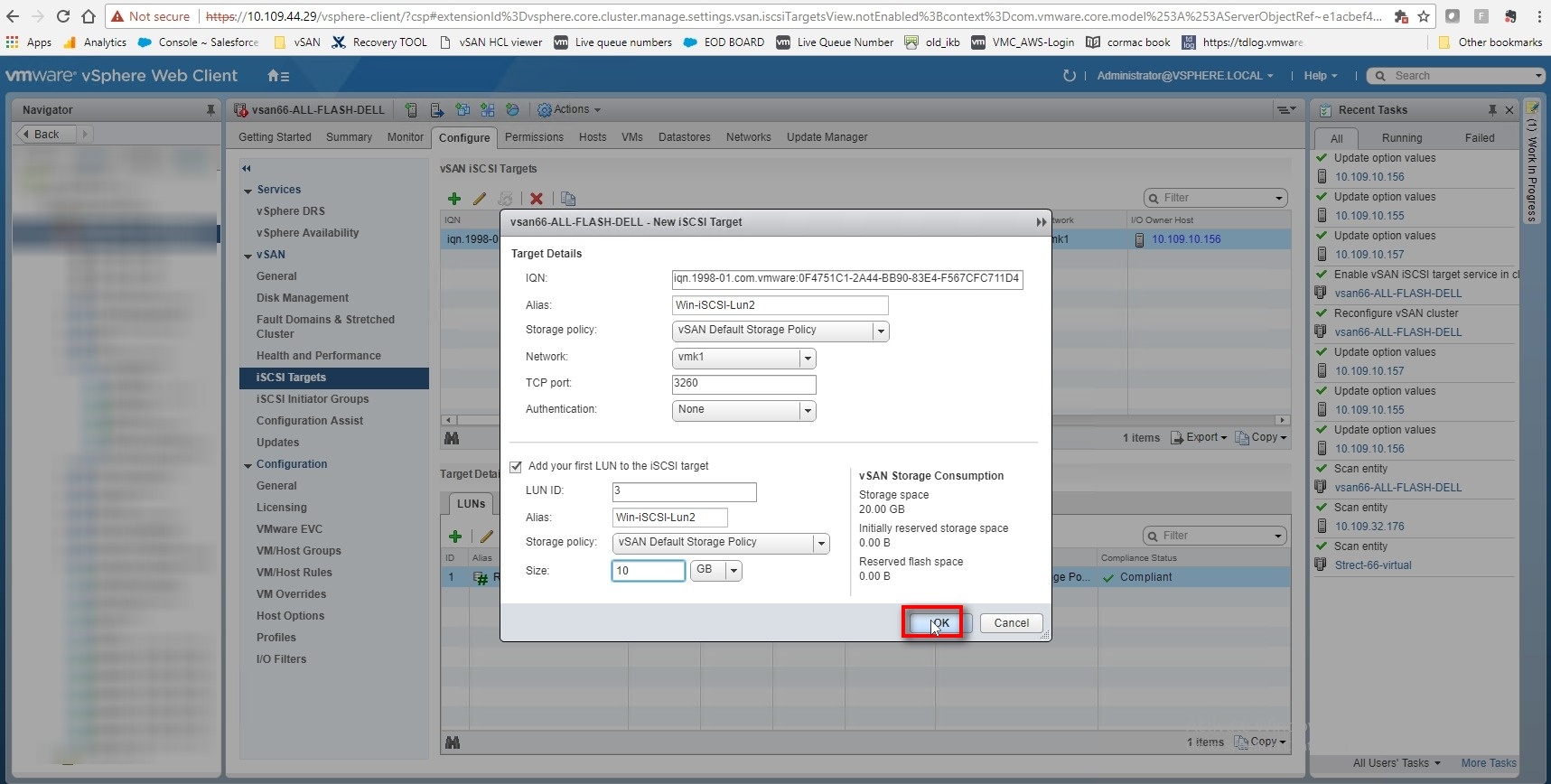
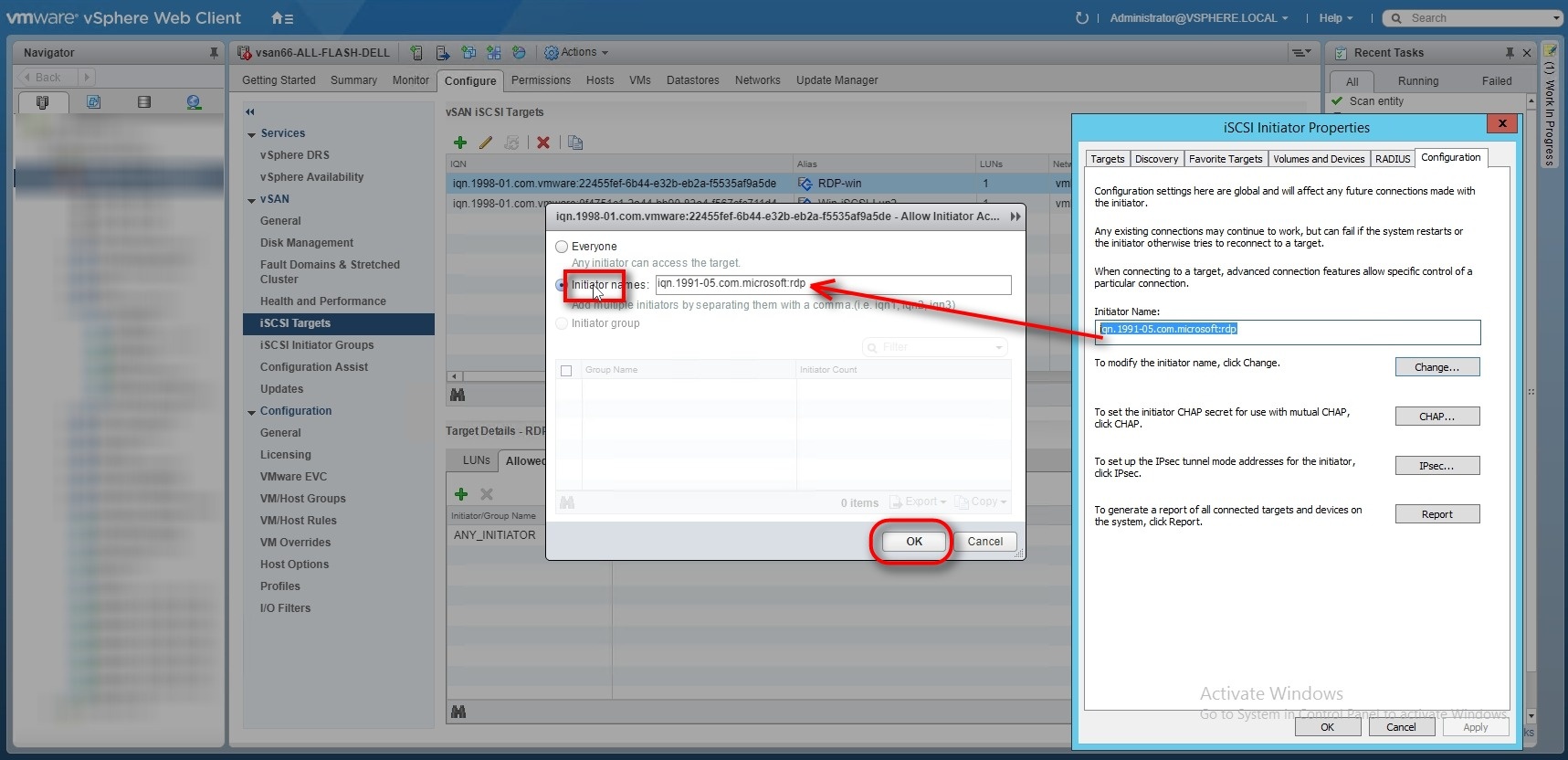
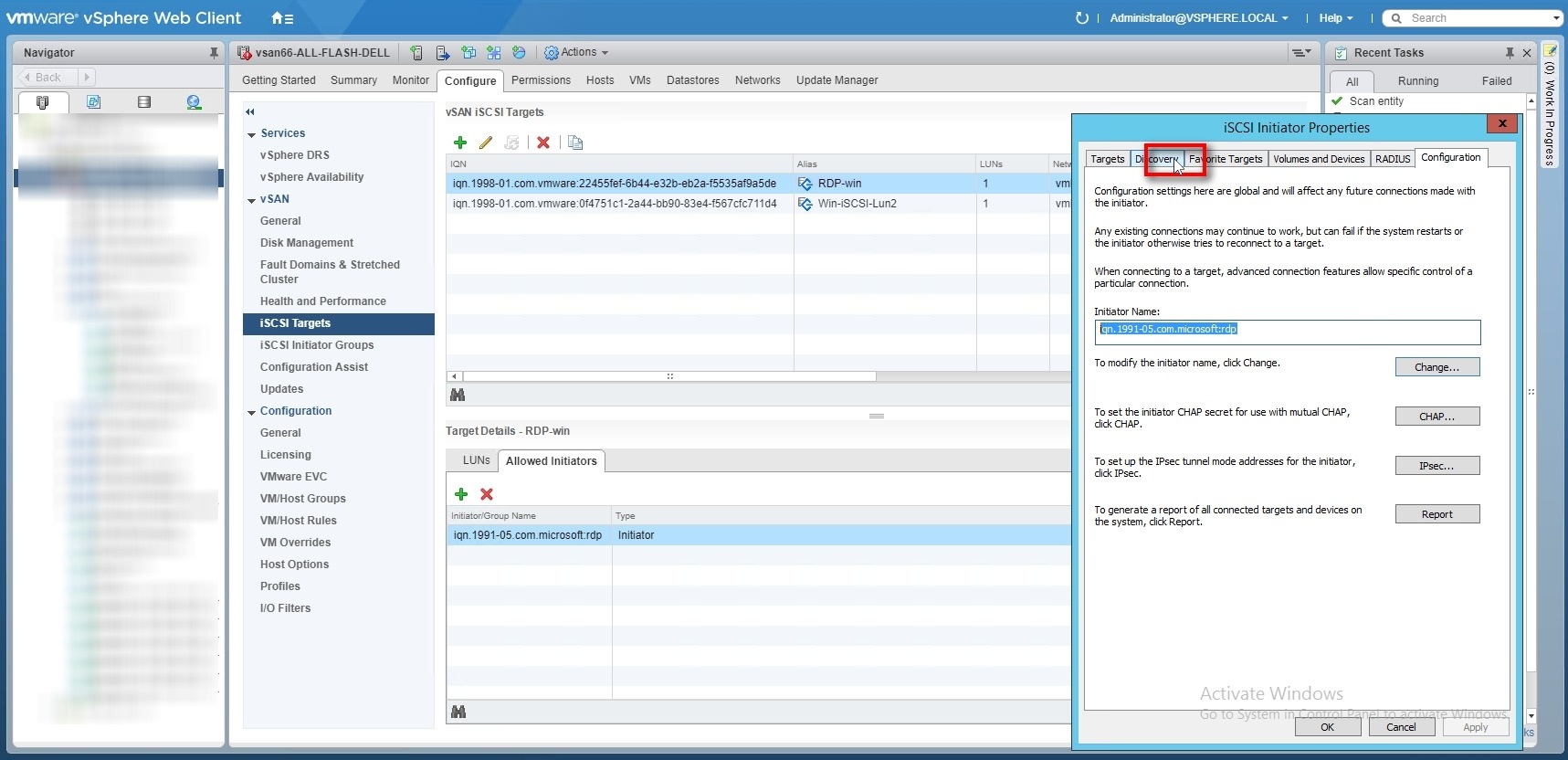
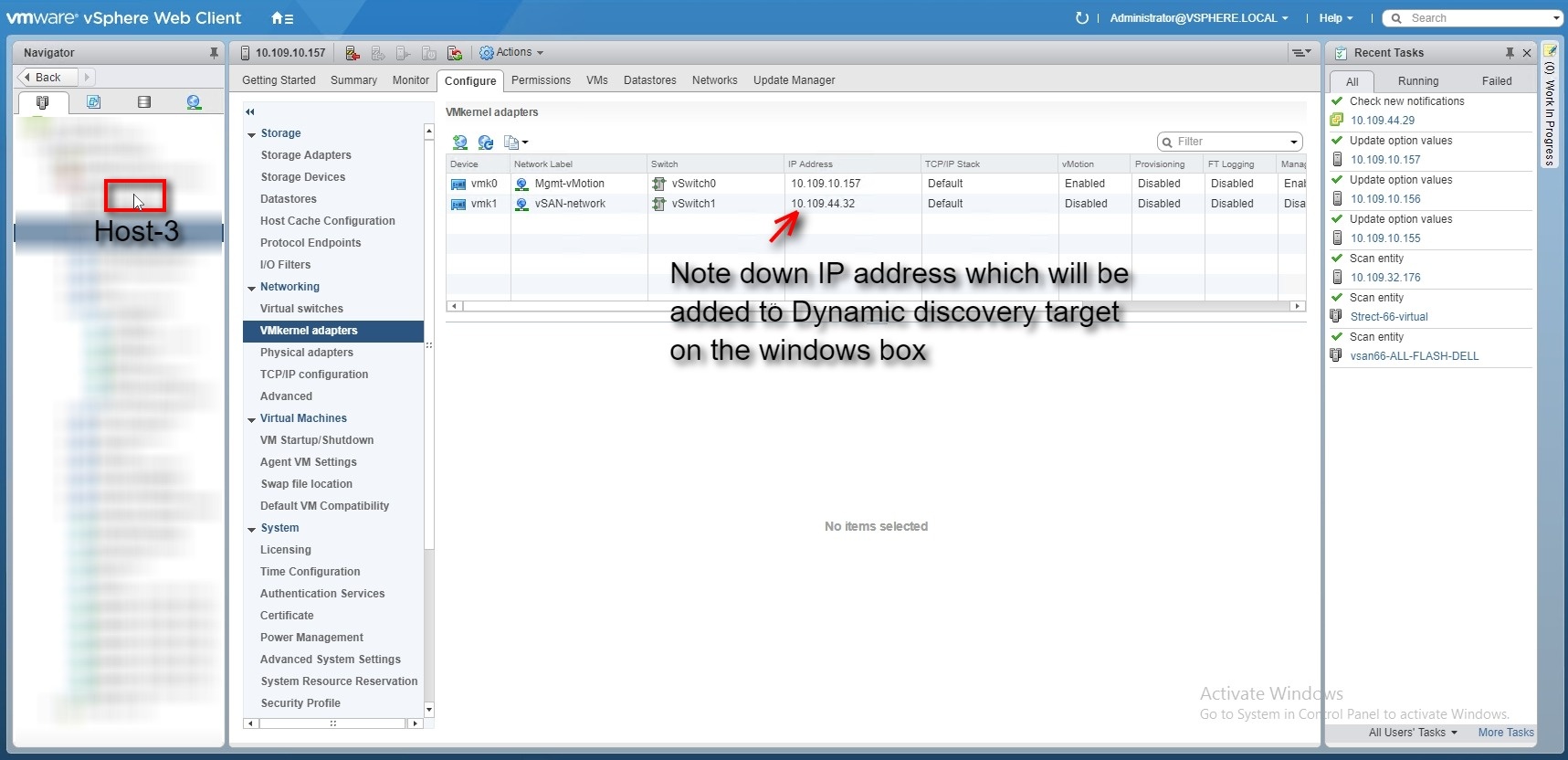
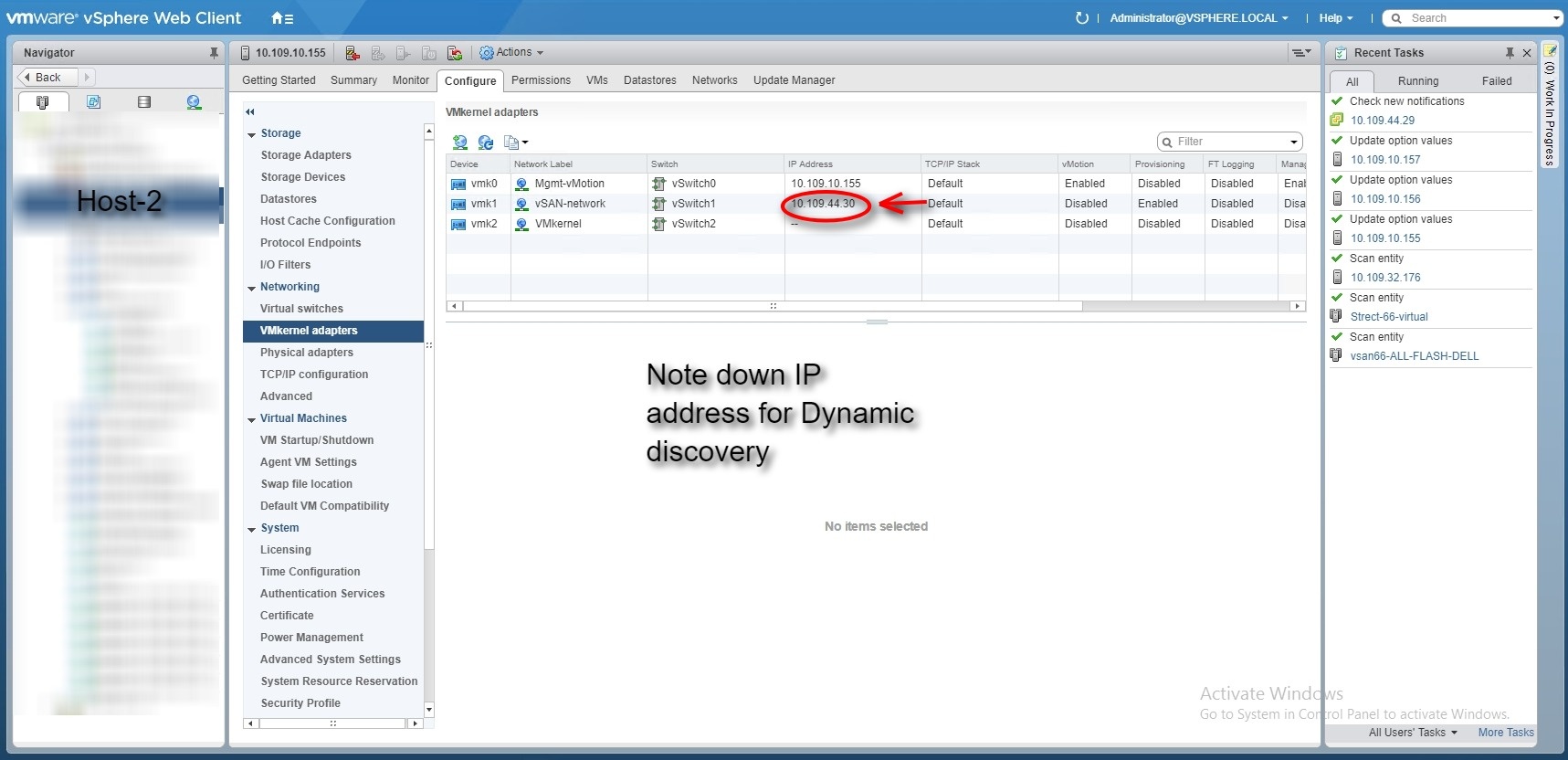
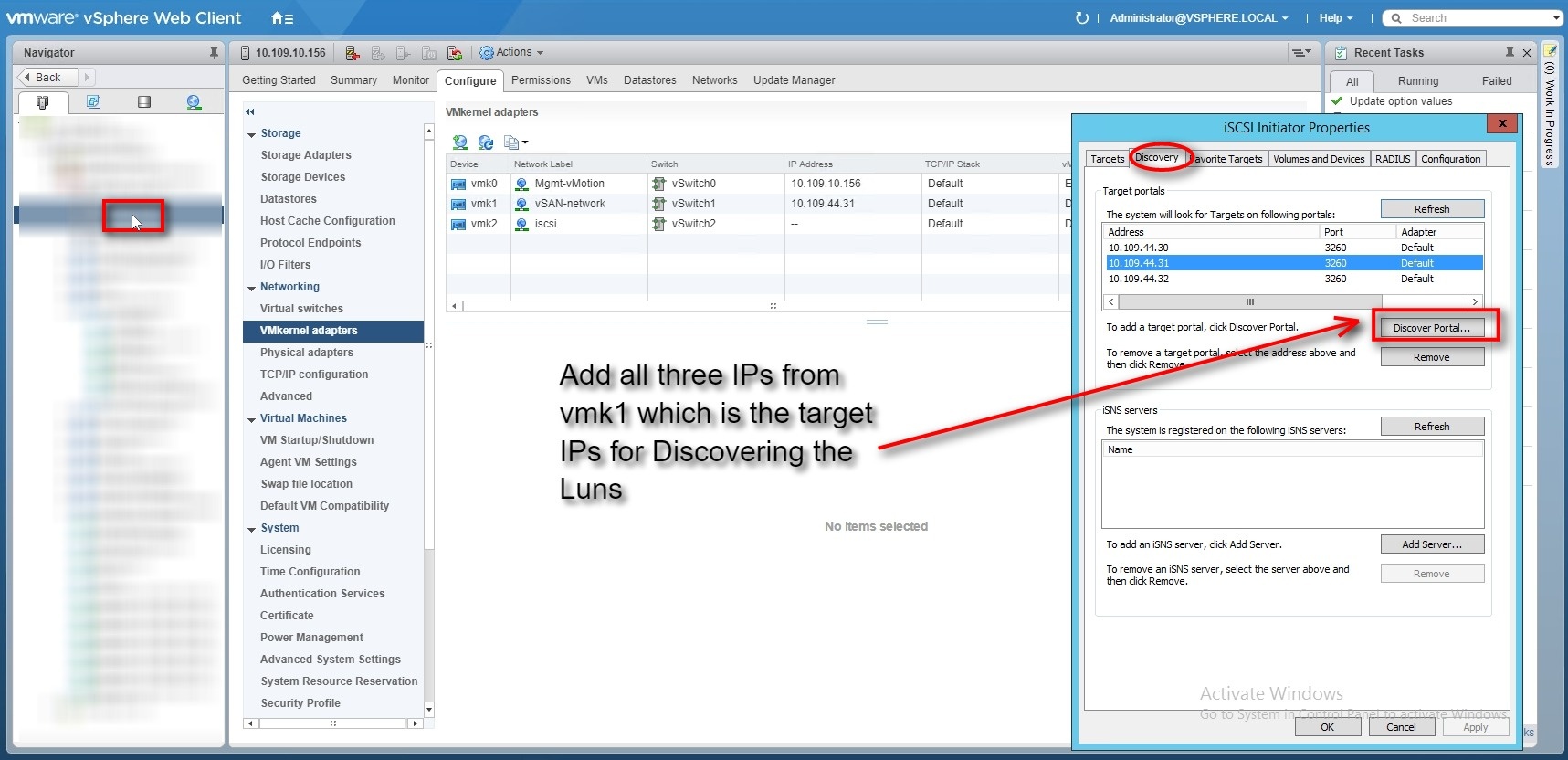
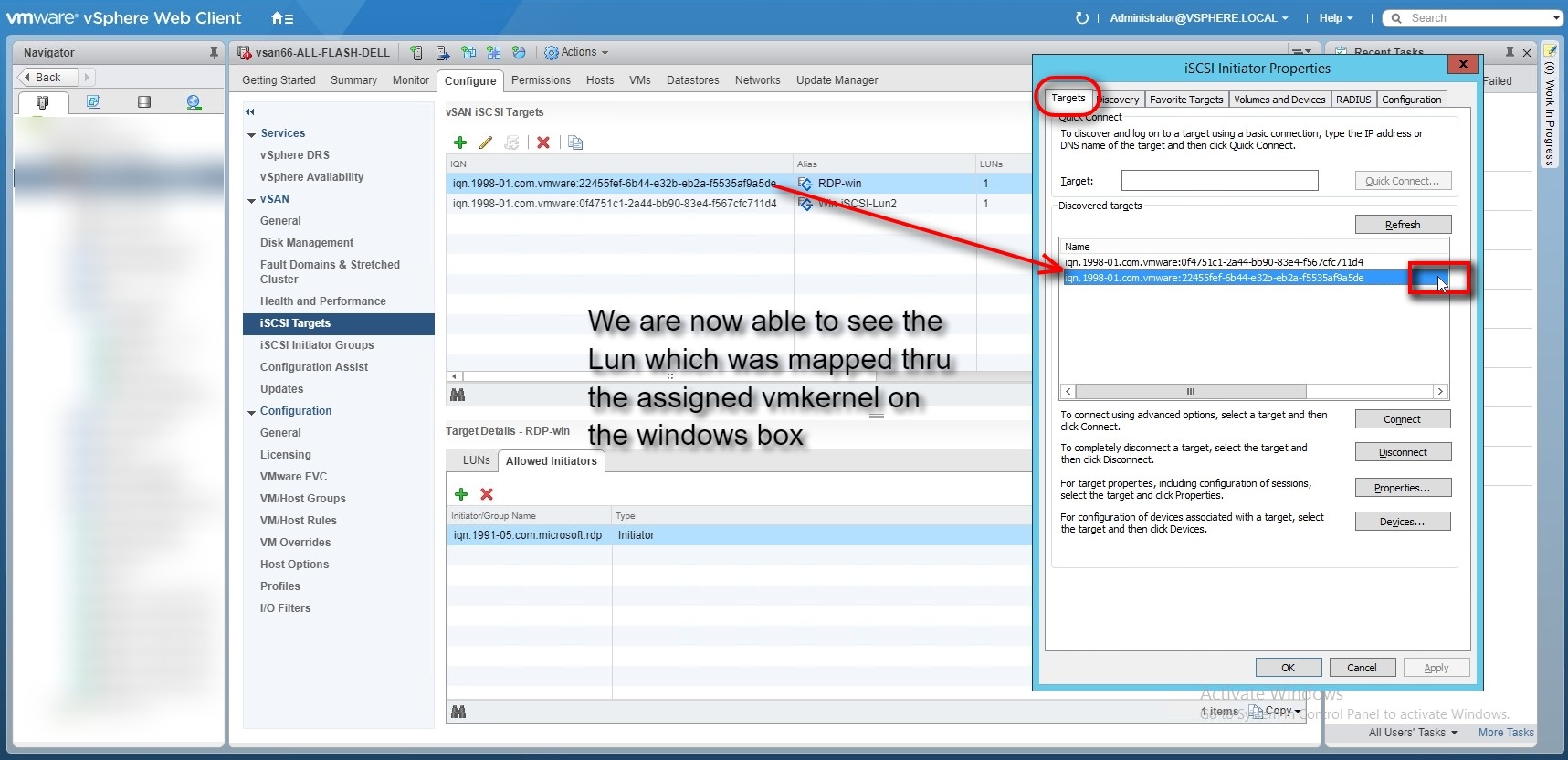
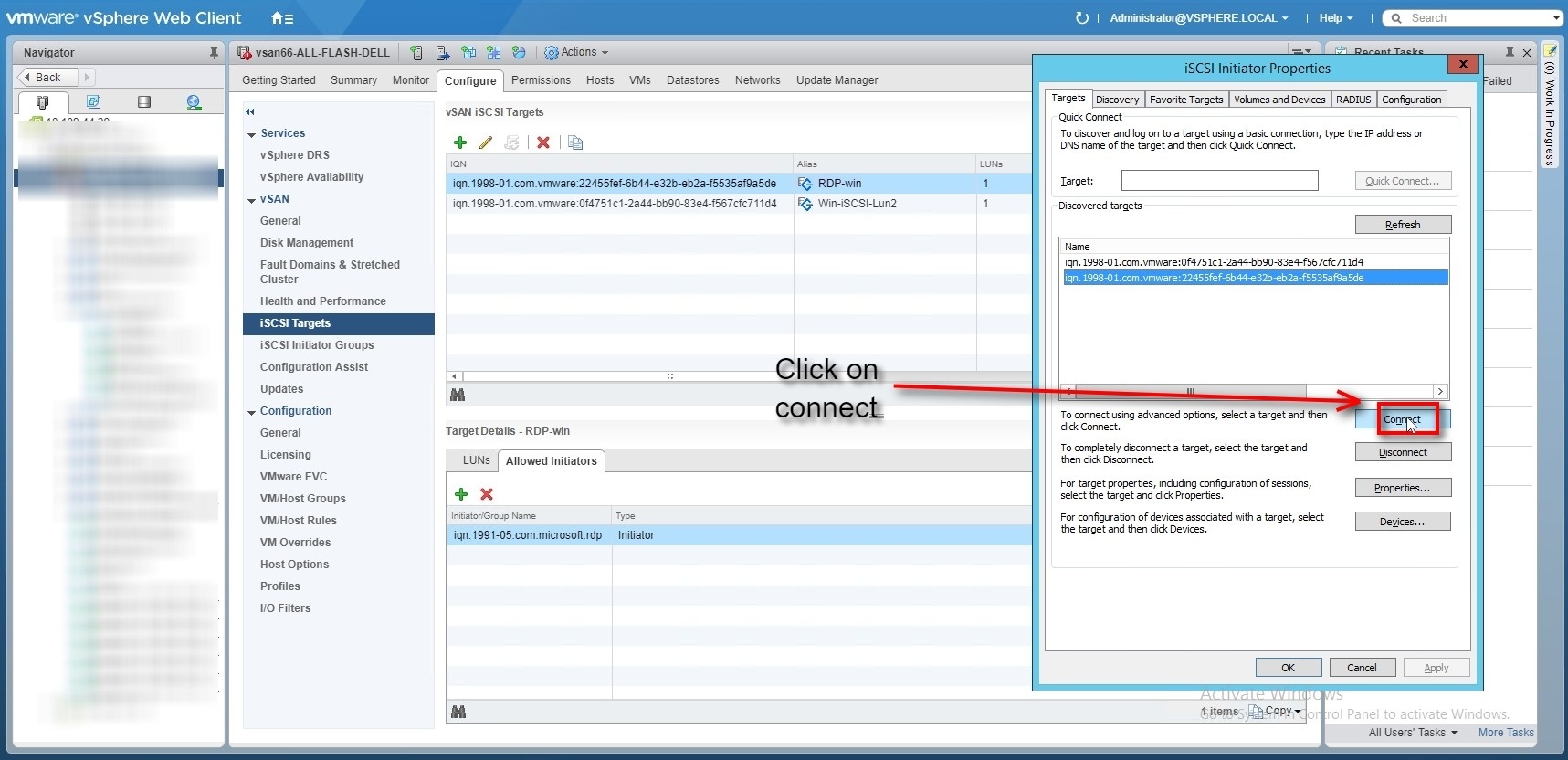
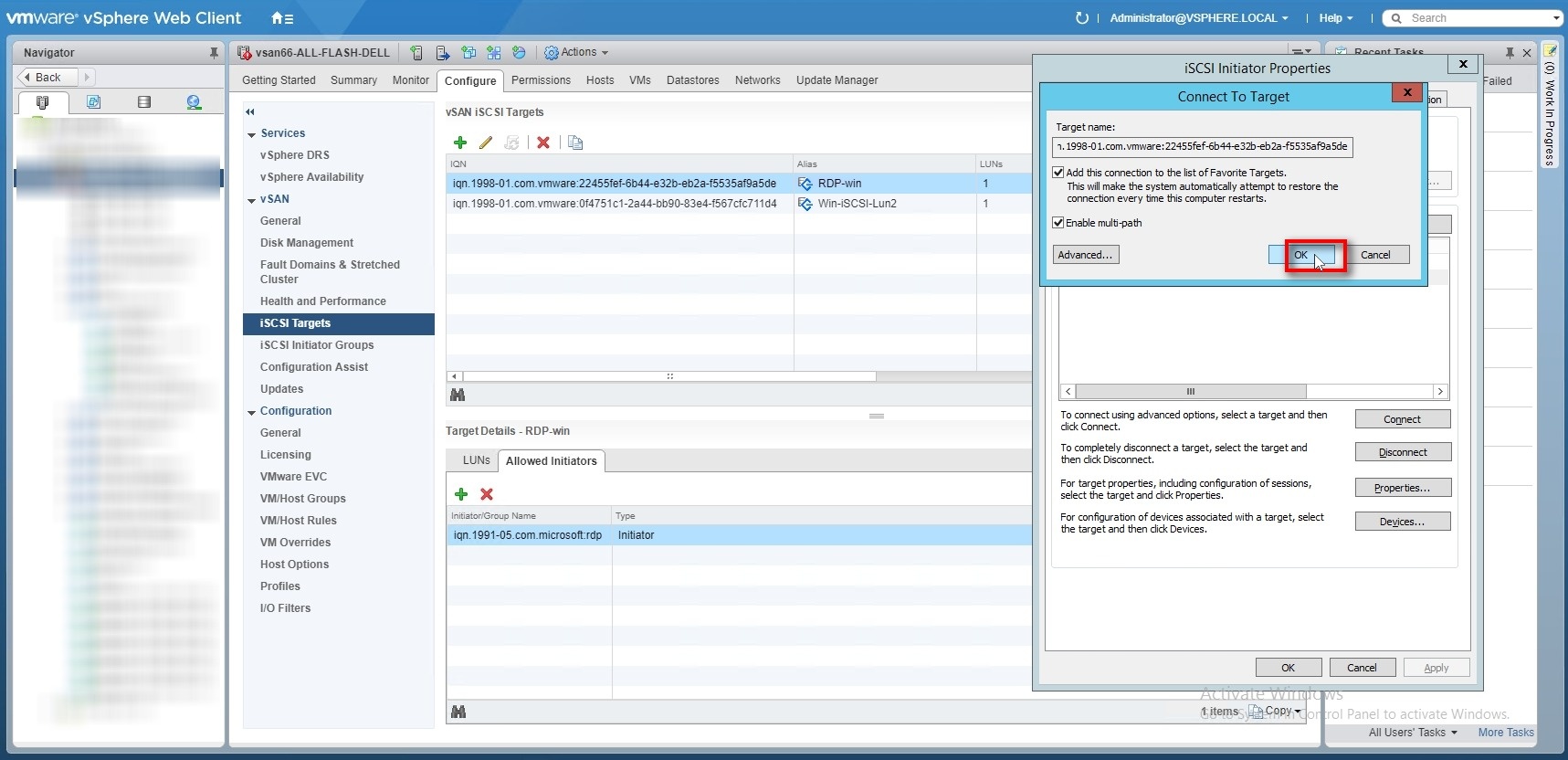
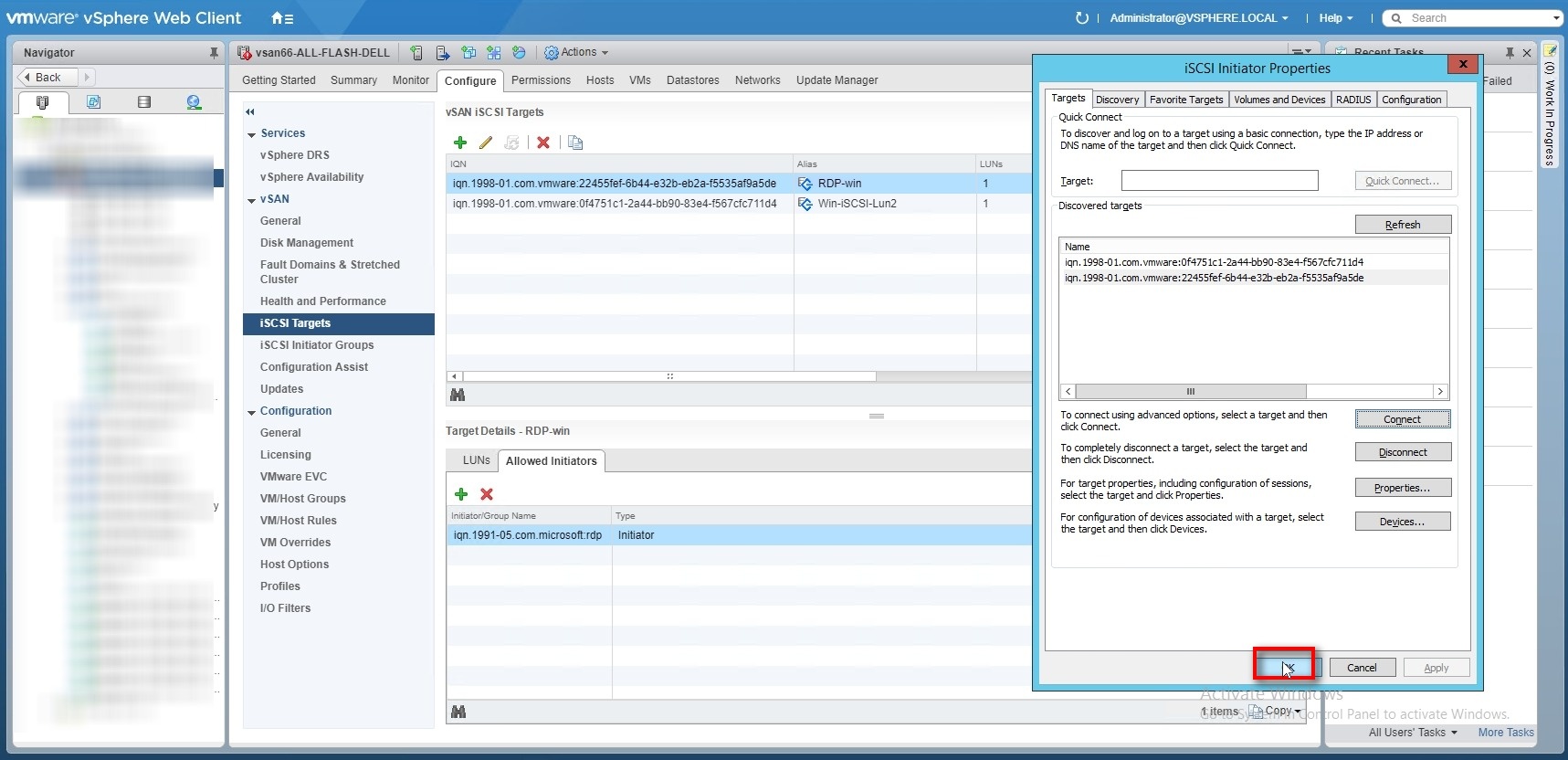
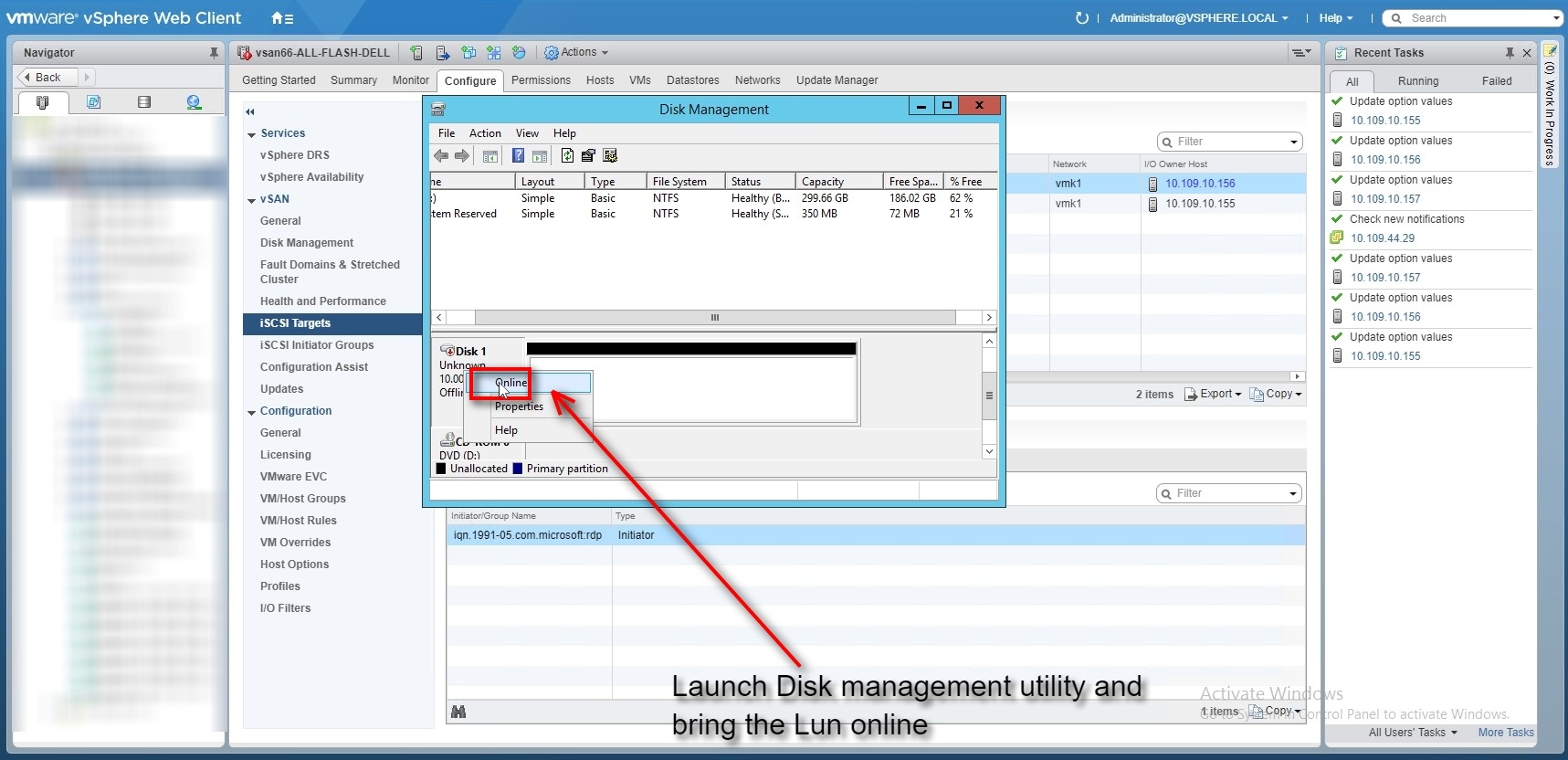
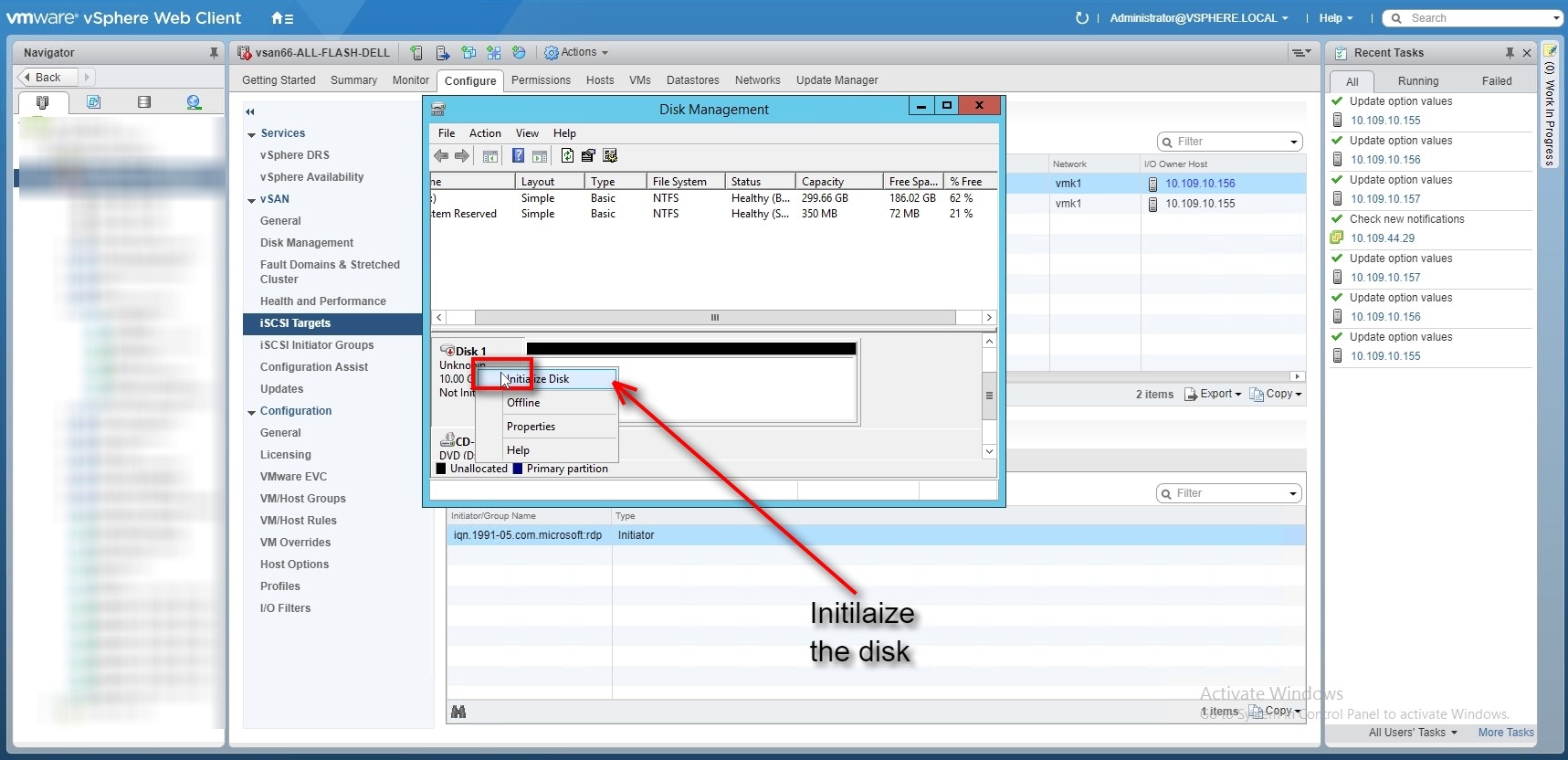
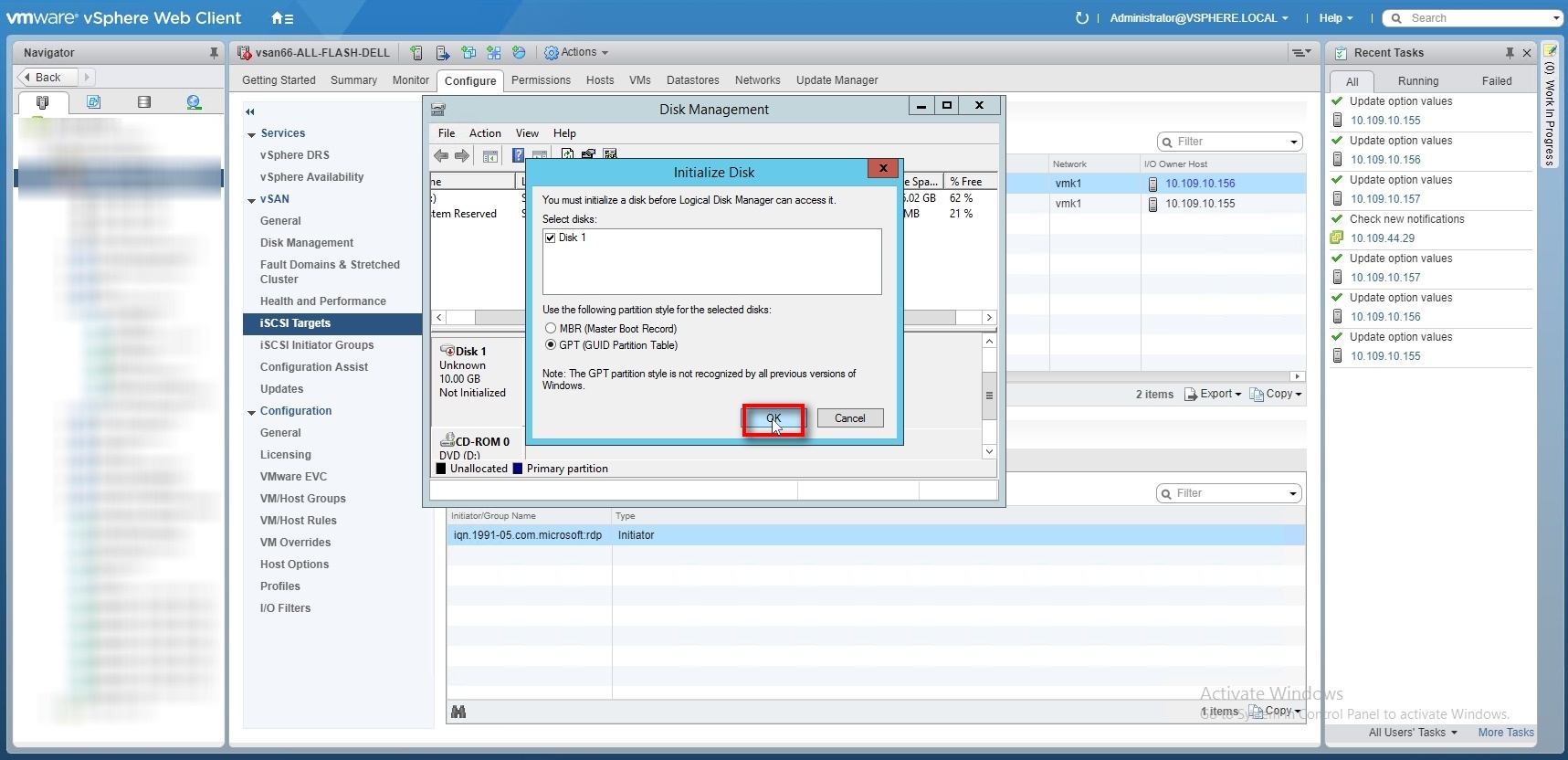
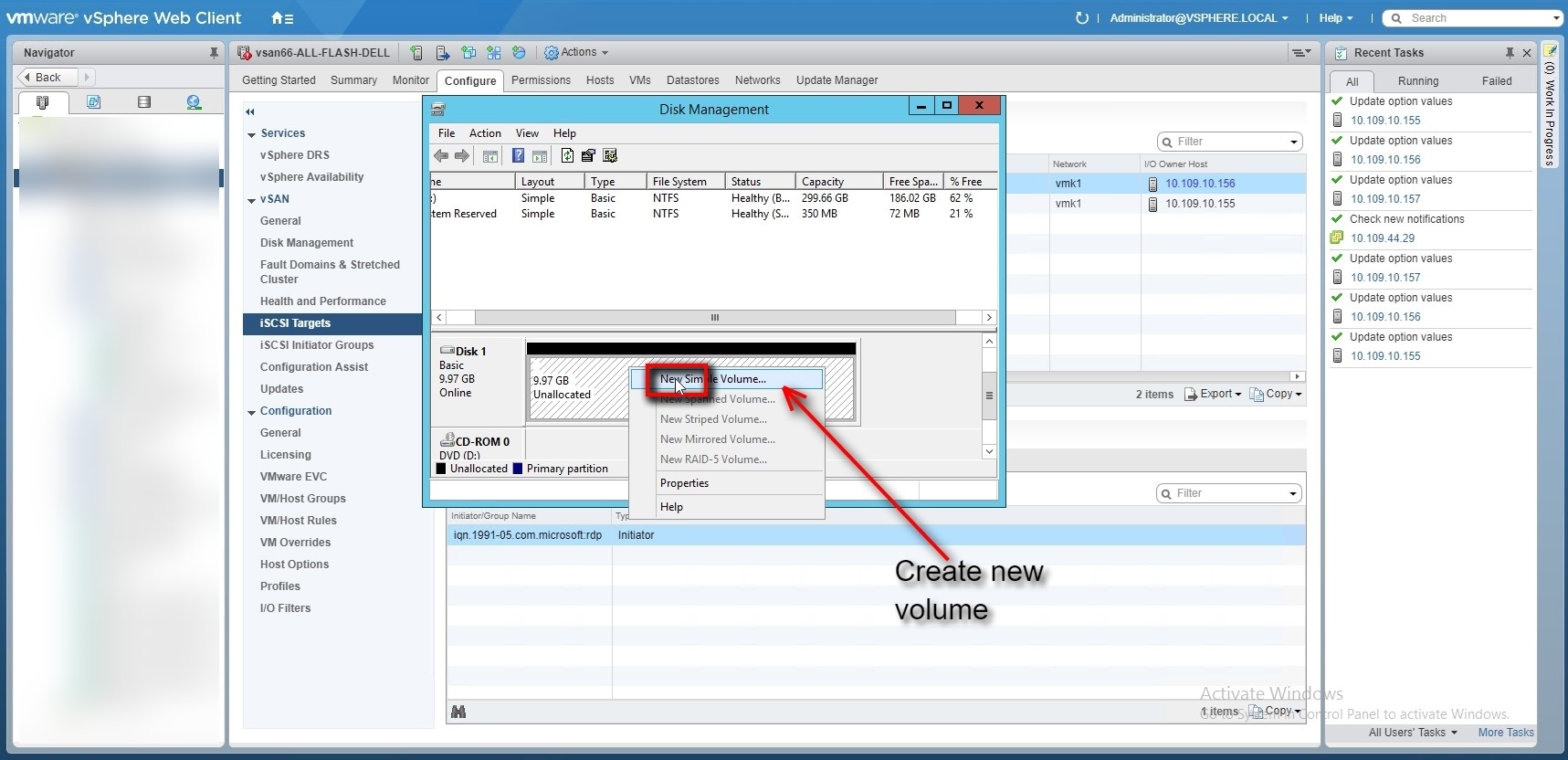
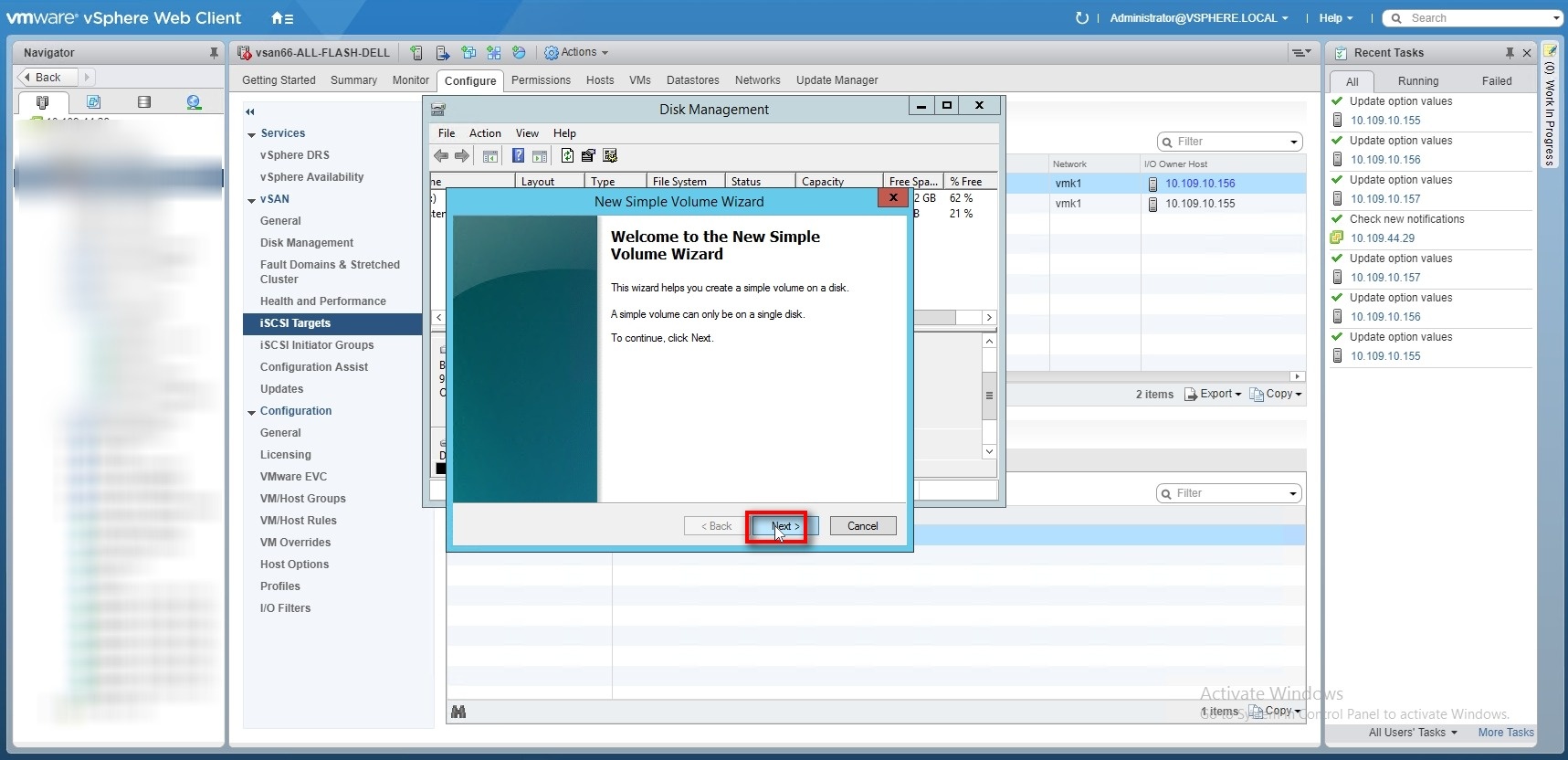
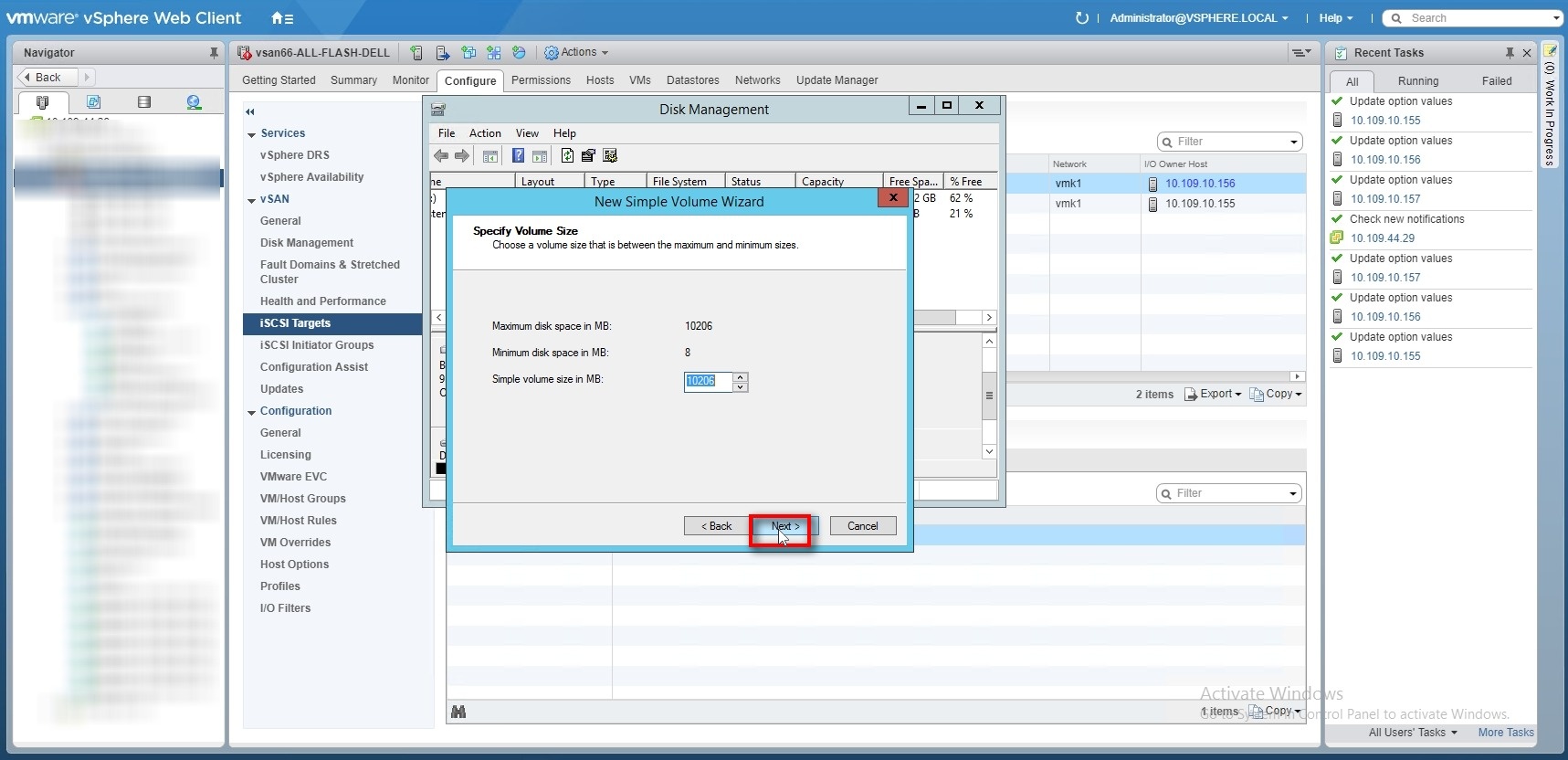
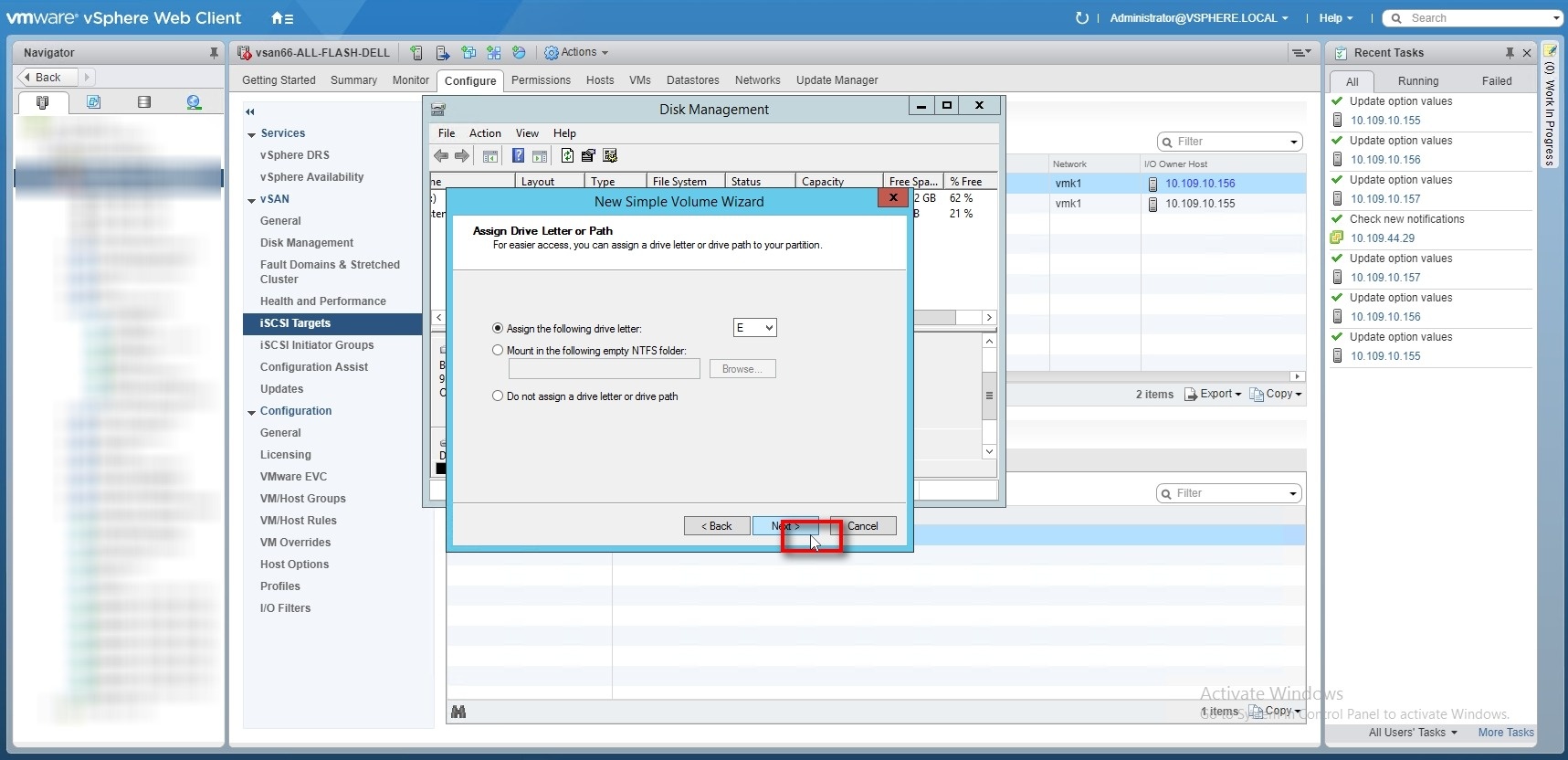
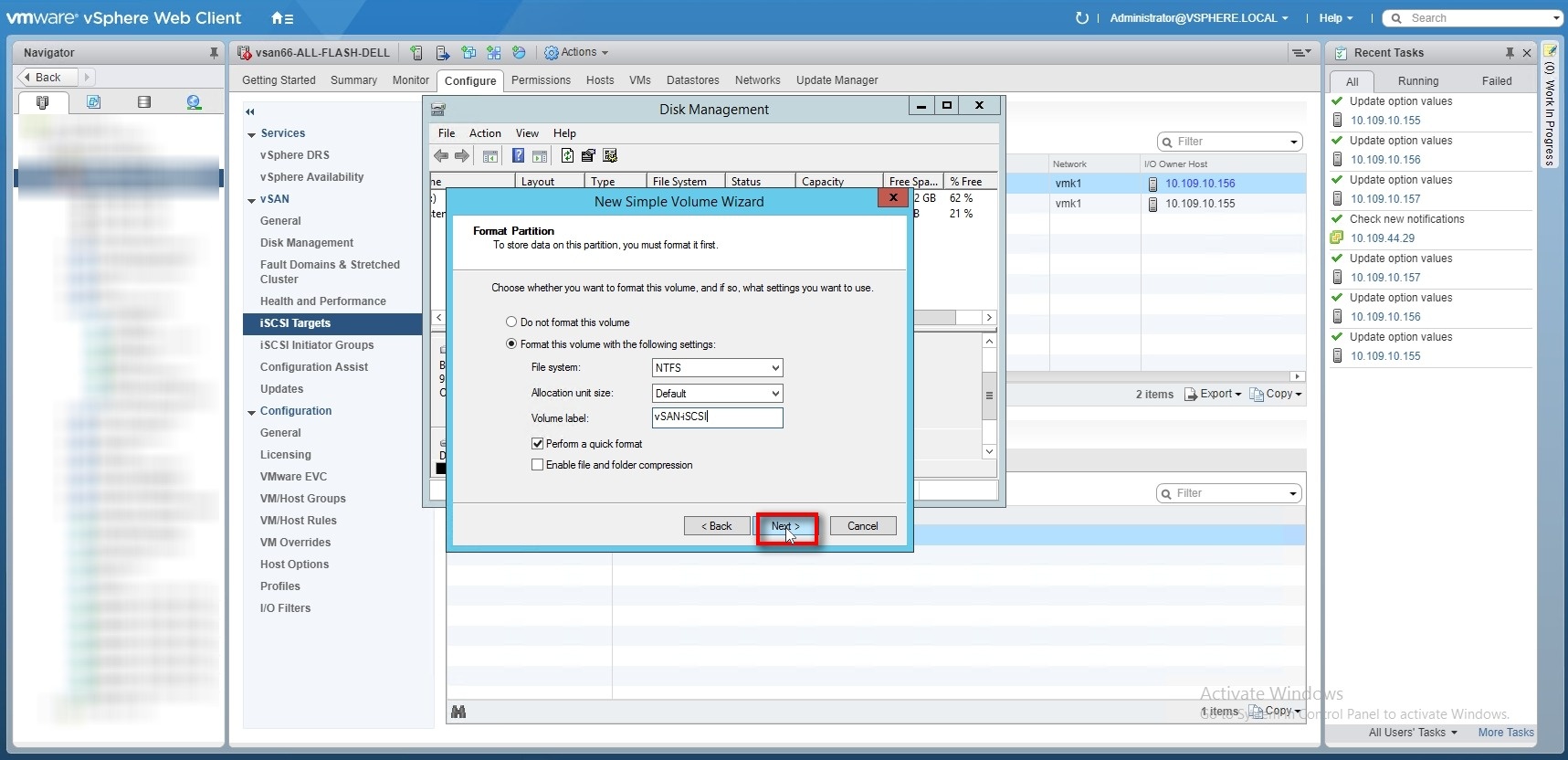
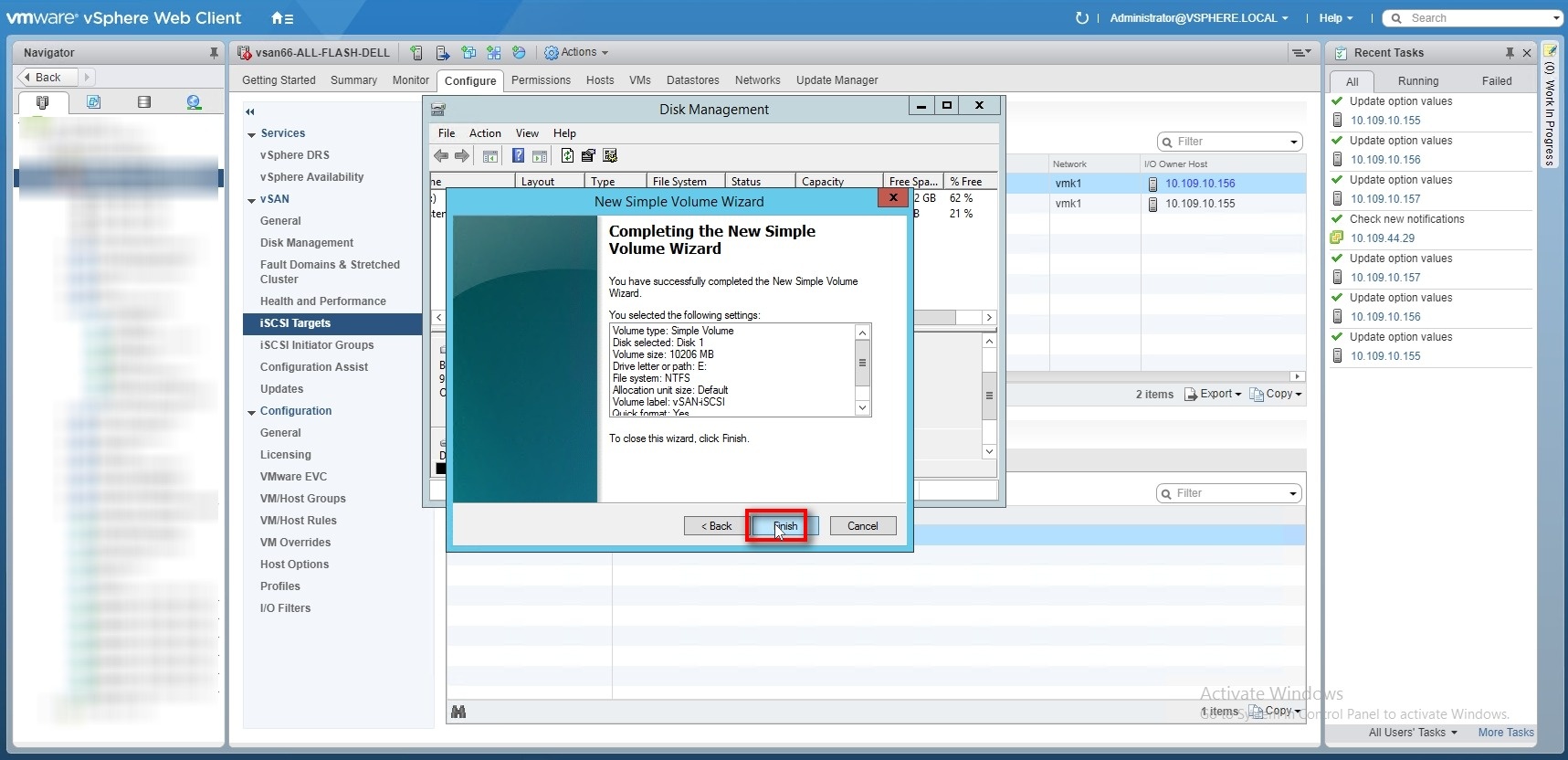
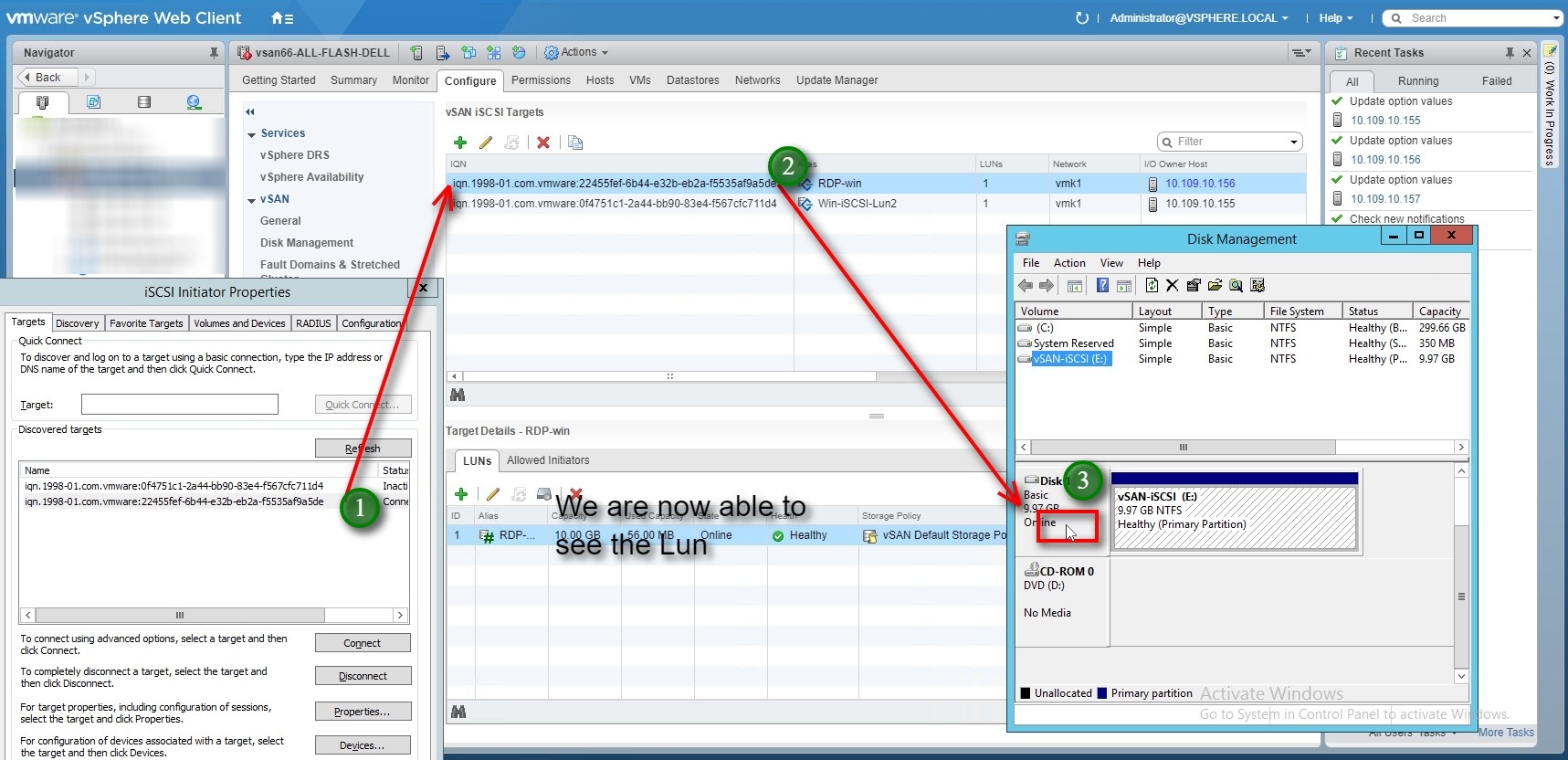
Looking at the objects for the iSCSI Lun export thru vSAN.
VIT (virtual iSCSI Target) is the service which runs on all the host is responsible to manage and facilitate the vSAN iSCSI target on all the hosts , I suggest you to see VMwareKB to troubleshoot “iSCSI target service”
After creating first iSCSI target when we look at Target owner host we see below messages , this indicates that the object for the target iSCSI lun was created successfully , if there were any issues while creating the iSCSI target from vcenter server , please see the vmkernel.log on the owner host for more details
Vmkerne.log : “less /var/log/vmkernel.log | grep -i vit” : this the logs seen during the time of creating a target .
2018-01-14T03:38:39.296Z cpu16:9176868 opID=a09e5a8d)World: 12235: VC opID VSAN-iSCSI-OP-52e79e76-7274-e36b-daa3-c5a03437e5b2 maps to vmkernel opID a09e5a8d 2018-01-14T03:38:44.440Z cpu17:9176879)Loading module vit ... 2018-01-14T03:38:44.441Z cpu17:9176879)Elf: 2043: module vit has license VMware 2018-01-14T03:38:44.450Z cpu17:9176879)VIT: Resetting config options 2018-01-14T03:38:44.450Z cpu17:9176879)vit: HeapLogSizes:497: Size of global heap 0x4307450f5000 : 8681472 bytes 2018-01-14T03:38:44.450Z cpu17:9176879)vit: HeapLogSizes:498: Size of target heap: 952320 bytes 2018-01-14T03:38:44.450Z cpu17:9176879)vit: HeapLogSizes:499: Size of LUN heap: 4601856 bytes 2018-01-14T03:38:44.450Z cpu17:9176879)vit: HeapLogSizes:500: Size of ctl_softc 12256 bytes. 2018-01-14T03:38:44.450Z cpu17:9176879)vit: HeapLogSizes:501: Size of cfiscsi_target 928 bytes. 2018-01-14T03:38:44.450Z cpu17:9176879)vit: HeapLogSizes:502: Size of ctl_lun 118584 bytes. 2018-01-14T03:38:44.453Z cpu17:9176879)vit: VitFssBeInit:543: Number of threads for IO task queue: 32 2018-01-14T03:38:44.457Z cpu17:9176879)Mod: 4968: Initialization of vit succeeded with module ID 119. 2018-01-14T03:38:44.457Z cpu17:9176879)vit loaded successfully. 2018-01-14T03:40:36.410Z cpu18:9177736 opID=40c602bf)World: 12235: VC opID VSAN-iSCSI-OP-52b07c6f-192f-031e-1c15-011af0ab1edf maps to vmkernel opID 40c602bf 2018-01-14T03:40:38.580Z cpu1:9177019)vit: cfiscsi_target_find_or_create:2542: Created heap RDP-win for target RDP-win. Heap pointer: 0x4305e6412000. 2018-01-14T03:40:42.078Z cpu22:9177018)vit: VitFSSBEIoctl_Create:2207: LUN heap cfss0 created (heap ID: 0x430750e13000). 2018-01-14T03:40:42.078Z cpu22:9177018)vit: VitFSSBE_GetInfo:1927: GetInfo size 10737418240 bs=512 size_blocks 20971520 2018-01-14T03:42:53.006Z cpu13:68816)vit: VITVsiGetIoStats:14820: Throttled: Perf stats isn't initialized for ctl LUN 0 2018-01-14T03:42:53.006Z cpu13:68816)vit: VITVsiGetBwStats:14711: Throttled: Perf stats isn't initialized for ctl LUN 0 2018-01-14T03:42:53.006Z cpu13:68816)vit: VITVsiGetLatencyStats:14939: Throttled: Perf stats isn't initialized for ctl LUN 0
Using certain esxcli vsan commands to get more information about the iSCSI targets
 1***localcli vsan iscsi status get
 2****Status: Enabled: true****
 3
 4localcli vsan iscsi target list***
 5Alias       iSCSI Qualified Name (IQN)                          Interface Port Authentication type LUNs Is Compliant UUID I/O Owner UUID
 6-------------------------------------------------------------------------------------------------------------------------------------------------------------------------------------------
 7**<span style="color: #0000ff;">RDP-win</span>**<span style="color: #0000ff;">*iqn.1998-01.com.vmware:22455fef-6b44-e32b-eb2a-f5535af9a5de*</span> vmk1 3260 No-Authentication 1 true **<span style="color: #0000ff;">34d15a5a-7ff7-924b-776c-ecf4bbec91a8</span>** 5937c663-8cb8-3d48-d3ad-ecf4bbec91a8
 8
 9**<span style="color: #993300;">Win-iSCSI-Lun2</span>***<span style="color: #993300;">iqn.1998-01.com.vmware:0f4751c1-2a44-bb90-83e4-f567cfc711d4</span>* vmk1 3260 No-Authentication 1 true **<span style="color: #993300;">62d65a5a-48dd-477d-8c86-ecf4bbec65d8</span>** 5938de9a-e35b-d745-c9ff-ecf4bbec65d8
10
11***localcli vsan iscsi homeobject get
12***
13Namespace Information:
14 UUID:**<span style="color: #008000;"> bfd05a5a-0dc2-53da-444a-ecf4bbec91a8</span>**
15 Policy: (("stripeWidth" i1) ("cacheReservation" i0) ("proportionalCapacity" (i0 i100)) ("hostFailuresToTolerate" i1) ("forceProvisioning" i0) ("spbmProfileId" "aa6d5a82-1c88-45da-85d3-3d74b91a5bad") ("spbmProfileGenerationNumber" l+2) ("CSN" l1) ("spbmProfileName" "vSAN Default Storage Policy"))
16 Is Compliant: true
17
18***localcli vsan iscsi target get --alias*****<span style="color: #0000ff;">RDP-win</span>**
19Target Information:
20 IQN: iqn.1998-01.com.vmware:22455fef-6b44-e32b-eb2a-f5535af9a5de
21 Alias: RDP-win
22 UUID: **<span style="color: #0000ff;">34d15a5a-7ff7-924b-776c-ecf4bbec91a8</span>**
23 Is Compliant: true
24 Policy: (("stripeWidth" i1) ("cacheReservation" i0) ("proportionalCapacity" (i0 i100)) ("hostFailuresToTolerate" i1) ("forceProvisioning" i0) ("spbmProfileId" "aa6d5a82-1c88-45da-85d3-3d74b91a5bad") ("spbmProfileGenerationNumber" l+2) ("CSN" l1) ("spbmProfileName" "vSAN Default Storage Policy"))
25 Interface: vmk1
26 Port: 3260
27 Authentication type: No-Authentication
28 Authentication userid:
29 Authentication mutual-userid:
30 LUNs: 1
31 I/O owner UUID: 5937c663-8cb8-3d48-d3ad-ecf4bbec91a8
32 I/O owner: IP-Address of the owning host .
33 Allowed initiators: iqn.1991-05.com.microsoft:rdp
34 Allowed initiator groups:
vit.conf :: cat /vmfs/volumes/vsan:523d5e5605a4d751-0c3304ae7a42599b/.iSCSI-CONFIG/etc/vit.conf
 1generation 8
 2auth-group default { auth-type none}
 3auth-group 34d15a5a-7ff7-924b-776c-ecf4bbec91a8 { auth-type none}
 4auth-group 62d65a5a-48dd-477d-8c86-ecf4bbec65d8 { auth-type none}
 5portal-group default { discovery-auth-group no-authentication listen vmk1:3260}
 6portal-group pg-vmk1-3260 { discovery-auth-group no-authentication listen vmk1:3260}
 7target **<span style="color: #0000ff;">iqn.1998-01.com.vmware:22455fef-6b44-e32b-eb2a-f5535af9a5de</span>**
 8{ alias "***<span style="color: #0000ff;">RDP-win</span>***" portal-group pg-vmk1-3260
 9 auth-group 34d15a5a-7ff7-924b-776c-ecf4bbec91a8
10 option uuid 34d15a5a-7ff7-924b-776c-ecf4bbec91a8
11 option owner-id 34d15a5a-7ff7-924b-776c-ecf4bbec91a8
12 lun 1 { backend vmdk path 34d15a5a-7ff7-924b-776c-ecf4bbec91a8/<span style="color: #0000ff;">***39d15a5a-c635-9e1b-0c92-ecf4bbec91a8.vmdk***</span>
13 size **20971520**
14 option lun-alias "<span style="color: #0000ff;">***RDP-win***</span>"
15 }
16}
17target **<span style="color: #993300;">iqn.1998-01.com.vmware:0f4751c1-2a44-bb90-83e4-f567cfc711d4</span>** {
18 alias "Win-iSCSI-Lun2"
19 portal-group pg-vmk1-3260
20 auth-group 62d65a5a-48dd-477d-8c86-ecf4bbec65d8
21 option uuid 62d65a5a-48dd-477d-8c86-ecf4bbec65d8
22 option owner-id 62d65a5a-48dd-477d-8c86-ecf4bbec65d8
23 lun 3 { backend vmdk path 62d65a5a-48dd-477d-8c86-ecf4bbec65d8/**<span style="color: #993300;">*67d65a5a-b1e9-fc41-a4d2-ecf4bbec91a8.vmdk*</span>**
24 size **20971520**
25 option lun-alias "<span style="color: #993300;">***Win-iSCSI-Lun2***</span>"
26 }
27}
**Looking at the Actual objects for the Luns which are created as objects in vSAN **
change directory to : /vmfs/volumes/vsan:523d5e5605a4d751-0c3304ae7a42599b/.iSCSI-CONFIG/targets :
/vmfs/volumes/vsan:523d5e5605a4d751-0c3304ae7a42599b/bfd05a5a-0dc2-53da-444a-ecf4bbec91a8/targets] ls -l total 16 lrwxrwxrwx 1 root root 42 Jan 14 03:40 34d15a5a-7ff7-924b-776c-ecf4bbec91a8 -> ../../34d15a5a-7ff7-924b-776c-ecf4bbec91a8 lrwxrwxrwx 1 root root 42 Jan 14 04:02 62d65a5a-48dd-477d-8c86-ecf4bbec65d8 -> ../../62d65a5a-48dd-477d-8c86-ecf4bbec65d8
 1cd to **<span style="color: #0000ff;">34d15a5a-7ff7-924b-776c-ecf4bbec91a8</span>** (Absolute Path : */vmfs/volumes/vsan:523d5e5605a4d751-0c3304ae7a42599b/34d15a5a-7ff7-924b-776c-ecf4bbec91a8*)
 2
 3<span style="color: #0000ff;">/vmfs/volumes/vsan:523d5e5605a4d751-0c3304ae7a42599b/34d15a5a-7ff7-924b-776c-ecf4bbec91a8</span>] ls -l
 4total 0
 5-rw------- 1 root root 521 Jan 14 03:40 **<span style="color: #0000ff;">39d15a5a-c635-9e1b-0c92-ecf4bbec91a8.vmdk
 6</span>**cat <span style="color: #0000ff;">**39d15a5a-c635-9e1b-0c92-ecf4bbec91a8.vmdk**</span> | grep vsan
 7RW 20971520 VMFS "vsan://<span style="color: #0000ff;">**39d15a5a-c635-9e1b-0c92-ecf4bbec91a8**</span>" <--- This is the destination object where the data is stored for the Lun "***<span style="color: #0000ff;">RDP-win</span>***" .
 8
 9[root@is-tse-d156:/vmfs/volumes/vsan:523d5e5605a4d751-0c3304ae7a42599b/bfd05a5a-0dc2-53da-444a-ecf4bbec91a8/targets] ls -l
10total 16
11lrwxrwxrwx 1 root root 42 Jan 14 03:40 34d15a5a-7ff7-924b-776c-ecf4bbec91a8 -> ../../34d15a5a-7ff7-924b-776c-ecf4bbec91a8
12lrwxrwxrwx 1 root root 42 Jan 14 04:02 62d65a5a-48dd-477d-8c86-ecf4bbec65d8 -> ../../62d65a5a-48dd-477d-8c86-ecf4bbec65d8
13
14cd : <span style="color: #993300;">**62d65a5a-48dd-477d-8c86-ecf4bbec65d8**</span> (Absolute Path : */vmfs/volumes/vsan:523d5e5605a4d751-0c3304ae7a42599b/62d65a5a-48dd-477d-8c86-ecf4bbec65d8*)
15
16<span style="color: #993300;">/vmfs/volumes/vsan:523d5e5605a4d751-0c3304ae7a42599b/62d65a5a-48dd-477d-8c86-ecf4bbec65d8</span>] ls -l
17total 0
18-rw------- 1 root root 521 Jan 14 04:02 **<span style="color: #993300;">67d65a5a-b1e9-fc41-a4d2-ecf4bbec91a8</span><span style="color: #993300;">.vmdk</span>**
19
20cat ***<span style="color: #993300;">67d65a5a-b1e9-fc41-a4d2-ecf4bbec91a8.vmdk</span>*** | grep vsan
21RW 20971520 VMFS "vsan://***<span style="color: #993300;">67d65a5a-b1e9-fc41-a4d2-ecf4bbec91a8</span>***" <--- This is the destination object where the data is stored for the Lun "***<span style="color: #993300;">Win-iSCSI-Lun2</span>***"
**Using esxcli vsan debug objects list to dump all object attributes to a file , we can look at the placement of the components for each Lun objects and component health .**
esxcli vsan debug object list > /tmp/list_all_object.txt
less the output file “less /tmp/list_all_object.txt” , search for “39d15a5a-c635-9e1b-0c92-ecf4bbec91a8“
Object UUID: 39d15a5a-c635-9e1b-0c92-ecf4bbec91a8 Version: 5 Health: healthy Owner: X.X.X.X (Host IP/FQDN) Policy: spbmProfileName: vSAN Default Storage Policy forceProvisioning: 0 spbmProfileGenerationNumber: 2 stripeWidth: 1 cacheReservation: 0 CSN: 2 spbmProfileId: aa6d5a82-1c88-45da-85d3-3d74b91a5bad proportionalCapacity: 0 hostFailuresToTolerate: 1
Configuration:
RAID_1 Component: 39d15a5a-1794-5d1c-c279-ecf4bbec91a8 Component State: ACTIVE, Address Space(B): 10737418240 (10.00GB), Disk UUID: 52f3a35d-2937-9811-81b0-026815670d32, Disk Name: naa.5002538c4044d87f:2 Votes: 1, Capacity Used(B): 12582912 (0.01GB), Physical Capacity Used(B): 4194304 (0.00GB), Host Name: is-tse-d157.isl.vmware.com
Component: 39d15a5a-afc7-5e1c-d3d4-ecf4bbec91a8 Component State: ACTIVE, Address Space(B): 10737418240 (10.00GB), Disk UUID: 52bf76f2-4863-2447-b919-1d7923a822e3, Disk Name: naa.5002538c4044d6ad:2 Votes: 1, Capacity Used(B): 12582912 (0.01GB), Physical Capacity Used(B): 4194304 (0.00GB), Host Name: is-tse-d155.isl.vmware.com
Witness: 39d15a5a-048a-5f1c-5381-ecf4bbec91a8 Component State: ACTIVE, Address Space(B): 0 (0.00GB), Disk UUID: 525b1f66-2d22-7897-d936-6eefd92c7019, Disk Name: naa.5002538c4044d6a3:2 Votes: 1, Capacity Used(B): 12582912 (0.01GB), Physical Capacity Used(B): 4194304 (0.00GB), Host Name: is-tse-d156.isl.vmware.com
Type: vdisk Path: /vmfs/volumes/vsan:523d5e5605a4d751-0c3304ae7a42599b/.iSCSI-CONFIG/targets/34d15a5a-7ff7-924b-776c-ecf4bbec91a8/52dc6cdc-d19d-ac5c-1b32-c5c94383310c.vmdk (Missing) Group UUID: 34d15a5a-7ff7-924b-776c-ecf4bbec91a8 Directory Name: (null)
less the previous output file “less /tmp/list_all_object.txt” , search for “62d65a5a-48dd-477d-8c86-ecf4bbec65d8“
 1Object UUID: 67d65a5a-b1e9-fc41-a4d2-ecf4bbec91a8
 2 Version: 5
 3**Health: healthy**
 4 Owner: X.X.X.X (Host IP/FQDN)
 5 Policy:
 6** spbmProfileName: vSAN Default Storage Policy**
 7 forceProvisioning: 0
 8 spbmProfileGenerationNumber: 2
 9 stripeWidth: 1
10 cacheReservation: 0
11 CSN: 4
12 spbmProfileId: aa6d5a82-1c88-45da-85d3-3d74b91a5bad
13 proportionalCapacity: 0
14 hostFailuresToTolerate: 1
15
16Configuration:
17
18**RAID_1**
19 Component: 67d65a5a-a21d-5c42-d279-ecf4bbec91a8
20**Component State: ACTIVE**, Address Space(B): 10737418240 (10.00GB), Disk UUID: 5270b13f-a6a0-50cf-0cb3-88d86b7d323e, Disk Name: naa.5002538c4044d6ab:2
21 Votes: 1, Capacity Used(B): 12582912 (0.01GB), Physical Capacity Used(B): 4194304 (0.00GB), Host Name: is-tse-d155.isl.vmware.com
22
23 Component: 67d65a5a-9967-5d42-3ad0-ecf4bbec91a8
24**Component State: ACTIVE**, Address Space(B): 10737418240 (10.00GB), Disk UUID: 525b1f66-2d22-7897-d936-6eefd92c7019, Disk Name: naa.5002538c4044d6a3:2
25 Votes: 1, Capacity Used(B): 12582912 (0.01GB), Physical Capacity Used(B): 4194304 (0.00GB), Host Name: is-tse-d156.isl.vmware.com
26
27 Witness: 67d65a5a-7227-5e42-31ab-ecf4bbec91a8
28**Component State: ACTIVE**, Address Space(B): 0 (0.00GB), Disk UUID: 529e9a5d-a5d8-6a18-3933-ed69eca58c36, Disk Name: naa.5002538c4044d6ae:2
29 Votes: 1, Capacity Used(B): 12582912 (0.01GB), Physical Capacity Used(B): 4194304 (0.00GB), Host Name: is-tse-d157.isl.vmware.com
30
31**Type: vdisk**
32 Path: /vmfs/volumes/vsan:523d5e5605a4d751-0c3304ae7a42599b/.iSCSI-CONFIG/targets/62d65a5a-48dd-477d-8c86-ecf4bbec65d8/5239144d-34bc-439c-1907-2c541a56a141.vmdk (Missing)
33 Group UUID: 62d65a5a-48dd-477d-8c86-ecf4bbec65d8
34 Directory Name: (null)
RVC command to look at the objects from vCenter server RVC session
***Note*: All iSCSI target will be listed under unassociated objects , be extra careful while deleting associated objects as you may accidentally delete vSAN iSCSI home folder and the target VMDKs and they cannot be recovered once deleted .***
1/localhost/vsan66-AF-DELL/computers/vsan66-ALL-FLASH-DELL> vsan.obj_status_report . -t
2
3Unassociated objects
41a39c759-70d6-ea0a-29f4-ecf4bbec65d8
5d9e59b59-9031-180b-6000-ecf4bbec65d8
679ca385a-f785-a610-5038-ecf4bbec65d8
7**<span style="color: #0000ff;">39d15a5a-c635-9e1b-0c92-ecf4bbec91a8</span>** <---------------iSCSI target Lun 1 object for **<span style="color: #0000ff;">RDP-win</span>** vmdk
8**<span style="color: #993300;">67d65a5a-b1e9-fc41-a4d2-ecf4bbec91a8</span>** <---------------iSCSI target Lun 3 object <span style="color: #993300;">**Win-iSCSI-Lun2**</span> vmdk
9<span style="color: #339966;">**bfd05a5a-0dc2-53da-444a-ecf4bbec91a8**</span> <---------------iSCSI home folder object